> For the complete documentation index, see [llms.txt](https://docs.geopard.tech/geopard-tutorials/llms.txt). Markdown versions of documentation pages are available by appending `.md` to page URLs; this page is available as [Markdown](https://docs.geopard.tech/geopard-tutorials/hu/termektura-webalkalmazas/zonaterkepek-es-elemzesek/zonaterkep-keszitese-muholdkepek-alapjan.md).
# Zónatérkép készítése műholdképek alapján
Építs gazdálkodási zónákat műholdképekből, hogy célzottan kezeld a változékonyságot és támogasd a változó dózisú döntéseket.
1. Válaszd ki a táblát a listában, kattints a **Zónatérkép létrehozása** gombra, válassza a **Egy rétegű**, majd kattintson a **Tovább**.
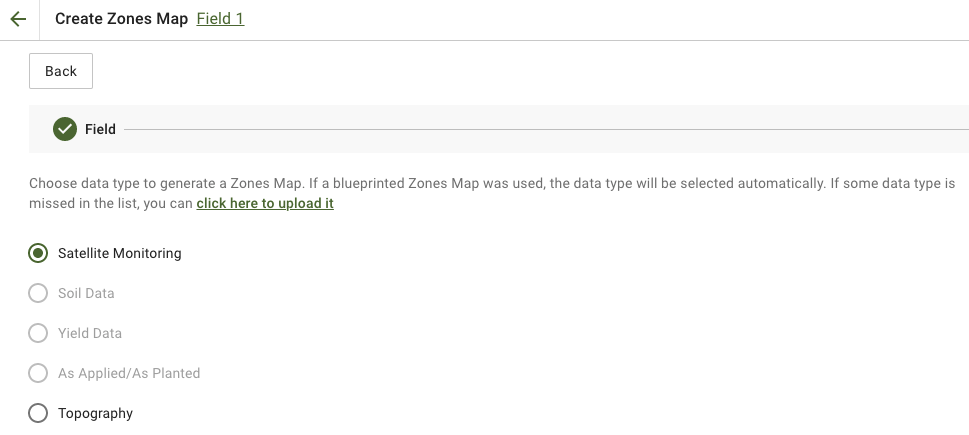
2. Kiválasztás **Műholdas megfigyelés** adattípust a folytatáshoz.
3. A következő lépésben kiválaszthat egy műholdképet. Szűrhet hónap, év, szolgáltató vagy NDVI szerint, és válthat a képi nézetek között, például NIR és EVI2 között. A **Itt egy rövid leírás az indextípusokról** hivatkozás ismerteti az elérhető indexeket. Ha módosítani szeretné az indexet, kattintson a melletti nyílra **EVI2**. Ezután kattintson **Tovább**.
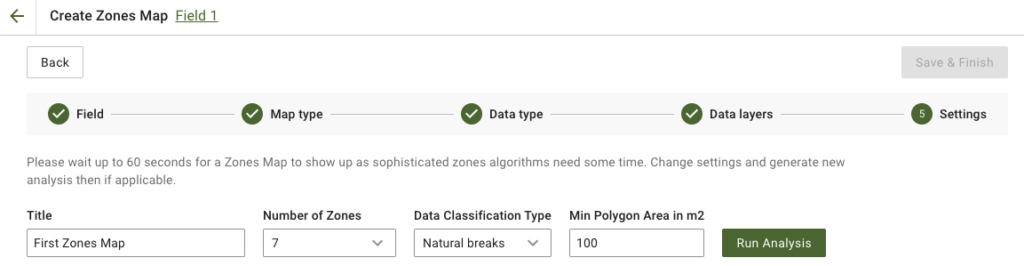
4. A következő lépésben szerkesztheti a címet, módosíthatja a zónák számát, [válasszon egy adatosztályozási típust](/geopard-tutorials/hu/termektura-webalkalmazas/zonaterkepek-es-elemzesek/adatosztalyozas-hasznalata.md), és adja meg a minimális poligonterületet négyzetméterben. Kattintson a **Elemzés futtatása** a folytatáshoz.
Az elemzés akár 60 másodpercig is futhat, attól függően, hogy milyen paramétereket adott meg.
5. Miután befejeződött, kattintson a **Mentés és befejezés**.
Miután elmentette, a következő üzenetet fogja látni:
Létrehozhat egy újabb zónatérképet, hozzárendelhet rátaértékeket, vagy megnyithatja az imént létrehozott Zónatérképet. Ha megnyitja, hasonló nézetet fog látni.
---
# Agent Instructions
This documentation is published with GitBook. GitBook is the documentation platform designed so that both humans and AI agents can read, navigate, and reason over technical content effectively. Learn more at gitbook.com.
## Querying This Documentation
If you need additional information that is not directly available in this page, you can query the documentation by asking a question.
Perform an HTTP GET request on the following URL with the `ask` and `goal` query parameters:
```
GET https://docs.geopard.tech/geopard-tutorials/hu/termektura-webalkalmazas/zonaterkepek-es-elemzesek/zonaterkep-keszitese-muholdkepek-alapjan.md?ask=&goal=
```
`ask` is the immediate question: it should be specific, self-contained, and written in natural language.
`goal` is what the user is ultimately trying to achieve, the reason they need the answer. Sharing it helps GitBook give you a better, more relevant answer. A goal is most helpful when it describes the outcome the user wants rather than restating the question. For example, with `ask=how do I create an API token`, a goal like `automate deployments from our CI pipeline` lets GitBook tailor the answer to that use case.
The response will contain a direct answer to the question and relevant excerpts and sources from the documentation.
Use this mechanism when the answer is not explicitly present in the current page, you need clarification or additional context, or you want to retrieve related documentation sections.