> For the complete documentation index, see [llms.txt](https://docs.geopard.tech/geopard-tutorials/llms.txt). Markdown versions of documentation pages are available by appending `.md` to page URLs; this page is available as [Markdown](https://docs.geopard.tech/geopard-tutorials/hu/api-dokumentacio/diagramok-az-alapfolyamatokkal/7.-racsos-adatok-letoltese.md).
# 7. Rácsos adatok letöltése
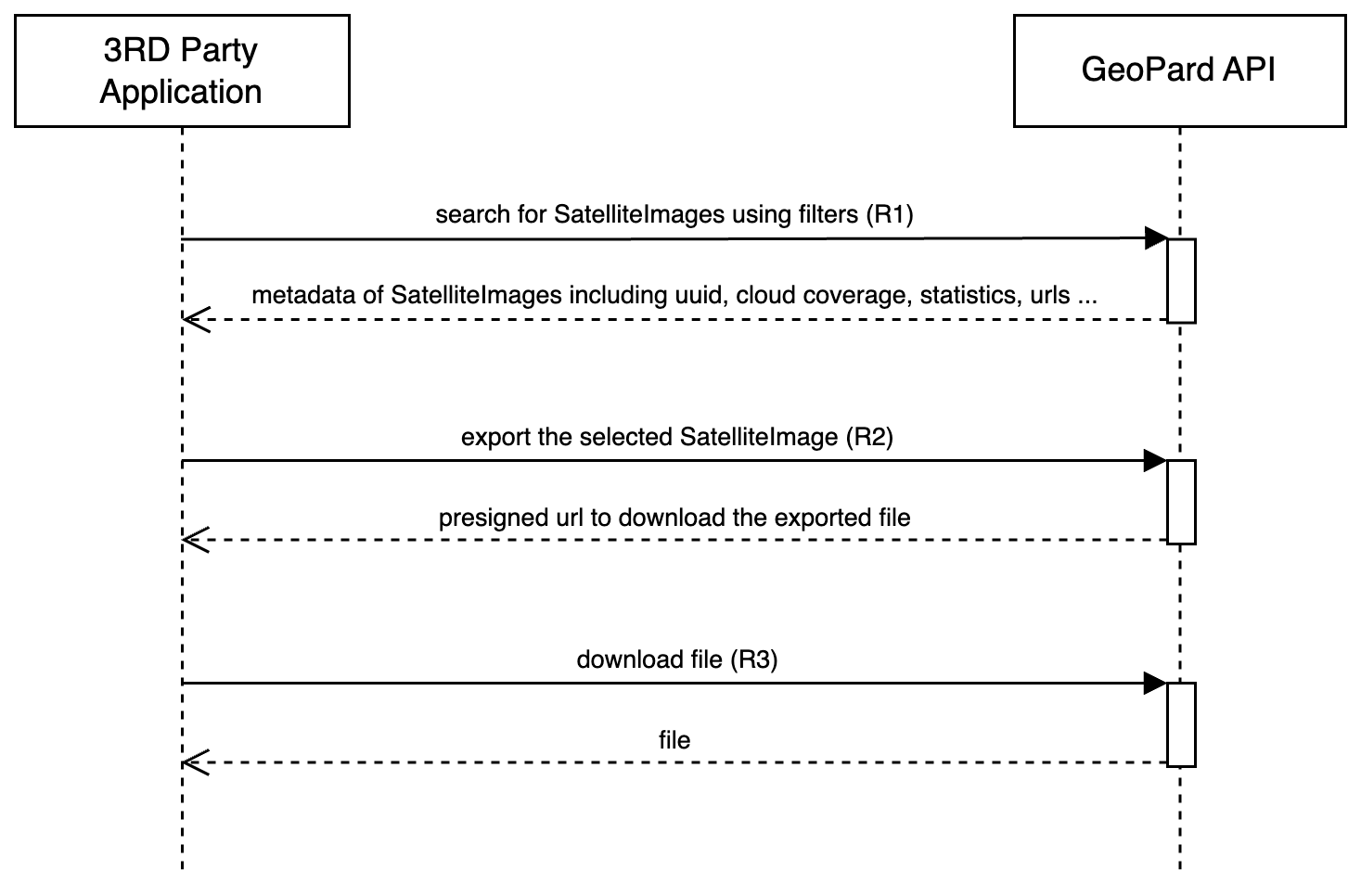
A következő két diagram célja bemutatni, hogyan lehet különféle adathalmazokat (SatelliteImage, SoilDataset, AsAppliedDataset, YieldDataset) lekérni a GeoPardból akár `GEOJSON` vagy `GEOTIFF` formátumban egy **rácsos** módon.
Az alábbi diagram bemutatja a SatelliteImage rácsos adatokként történő lekérésének folyamatát. [ITT](/geopard-tutorials/hu/termektura-webalkalmazas/export-letoltes/muholdkepek-exportalasa-geotiff-vagy-geojson-formatumban.md) egy hivatkozás a GeoPard felhasználói felület oktatóanyagára, amely részletesen elmagyarázza a szolgáltatott tartalmat. Az export művelet egy konkrét SatelliteImage kiválasztásával indul az exporthoz ([Kérelem 1 vagy R1](/geopard-tutorials/hu/api-dokumentacio/geopard-api-keresek-attekintese/3.-lekerdezes-satelliteimages-lekerese.md)), majd ezt követi a sourceDataUrl létrehozásának elindítása ([Kérelem 2 vagy R2](https://docs.geopard.tech/geopard-tutorials/hu/api-dokumentacio/diagramok-az-alapfolyamatokkal/pages/dcaaf8ed89255343bb5e874f8eb90c2730923eba#1.-request-a-file-to-export) ). Miután ez a URL generálva lett, az API fogyasztók közvetlenül letölthetik a fájlt erről az URL-ről ([Kérelem 3 vagy R3](https://docs.geopard.tech/geopard-tutorials/hu/api-dokumentacio/diagramok-az-alapfolyamatokkal/pages/dcaaf8ed89255343bb5e874f8eb90c2730923eba#2.-download-the-generated-file)).
Az alábbi diagram tükrözi az első diagramban leírt folyamatot, de ez a SoilDataset, AsAppliedDataset és YieldDataset esetére alkalmazandó. Ezeknek az adathalmazoknak a lekérése és exportja ugyanazokat a lépéseket követi, mint a SatelliteImage-é: lekérni az adathalmaz metaadatait, majd elindítani egy URL generálását a további letöltéshez.
SoilDataset dokumentációja: [Kérelem 4 vagy R4](/geopard-tutorials/hu/api-dokumentacio/geopard-api-keresek-attekintese/17.-lekerdezes-soildatasets-lekerese.md), [Kérés 5 vagy R5](https://docs.geopard.tech/geopard-tutorials/hu/api-dokumentacio/diagramok-az-alapfolyamatokkal/pages/8e16ac23184c846fc0211ea3b677ebf23bd4c9d4#1.-request-a-file-to-export), [Kérés 6 vagy R6](https://docs.geopard.tech/geopard-tutorials/hu/api-dokumentacio/diagramok-az-alapfolyamatokkal/pages/8e16ac23184c846fc0211ea3b677ebf23bd4c9d4#2.-download-the-generated-file). \
AsAppliedDataset dokumentációja: [Kérelem 4 vagy R4](/geopard-tutorials/hu/api-dokumentacio/geopard-api-keresek-attekintese/59.-lekerdezes-asapplieddatasets-lekerese.md), [Kérés 5 vagy R5](https://docs.geopard.tech/geopard-tutorials/hu/api-dokumentacio/diagramok-az-alapfolyamatokkal/pages/3738a04762481bdff308a51eb85456055a5878cc#1.-request-a-file-to-export), [Kérés 6 vagy R6](https://docs.geopard.tech/geopard-tutorials/hu/api-dokumentacio/diagramok-az-alapfolyamatokkal/pages/3738a04762481bdff308a51eb85456055a5878cc#2.-download-the-generated-file). \
YieldDataset dokumentációja: [Kérelem 4 vagy R4](/geopard-tutorials/hu/api-dokumentacio/geopard-api-keresek-attekintese/16.-lekerdezes-hozamadathalmazok-lekerese.md),[ Kérés 5 vagy R5](https://docs.geopard.tech/geopard-tutorials/hu/api-dokumentacio/diagramok-az-alapfolyamatokkal/pages/a9242efe98e1b0a67dc6c1191c20765b75b64280#1.-request-a-file-to-export), [Kérés 6 vagy R6](https://docs.geopard.tech/geopard-tutorials/hu/api-dokumentacio/diagramok-az-alapfolyamatokkal/pages/a9242efe98e1b0a67dc6c1191c20765b75b64280#2.-download-the-generated-file).
---
# Agent Instructions
This documentation is published with GitBook. GitBook is the documentation platform designed so that both humans and AI agents can read, navigate, and reason over technical content effectively. Learn more at gitbook.com.
## Querying This Documentation
If you need additional information that is not directly available in this page, you can query the documentation by asking a question.
Perform an HTTP GET request on the following URL with the `ask` and `goal` query parameters:
```
GET https://docs.geopard.tech/geopard-tutorials/hu/api-dokumentacio/diagramok-az-alapfolyamatokkal/7.-racsos-adatok-letoltese.md?ask=&goal=
```
`ask` is the immediate question: it should be specific, self-contained, and written in natural language.
`goal` is what the user is ultimately trying to achieve, the reason they need the answer. Sharing it helps GitBook give you a better, more relevant answer. A goal is most helpful when it describes the outcome the user wants rather than restating the question. For example, with `ask=how do I create an API token`, a goal like `automate deployments from our CI pipeline` lets GitBook tailor the answer to that use case.
The response will contain a direct answer to the question and relevant excerpts and sources from the documentation.
Use this mechanism when the answer is not explicitly present in the current page, you need clarification or additional context, or you want to retrieve related documentation sections.