> For the complete documentation index, see [llms.txt](https://docs.geopard.tech/geopard-tutorials/llms.txt). Markdown versions of documentation pages are available by appending `.md` to page URLs; this page is available as [Markdown](https://docs.geopard.tech/geopard-tutorials/hu/api-dokumentacio/diagrams-with-basic-flows/5.-execute-equations.md).
# 5. Egyenletek futtatása
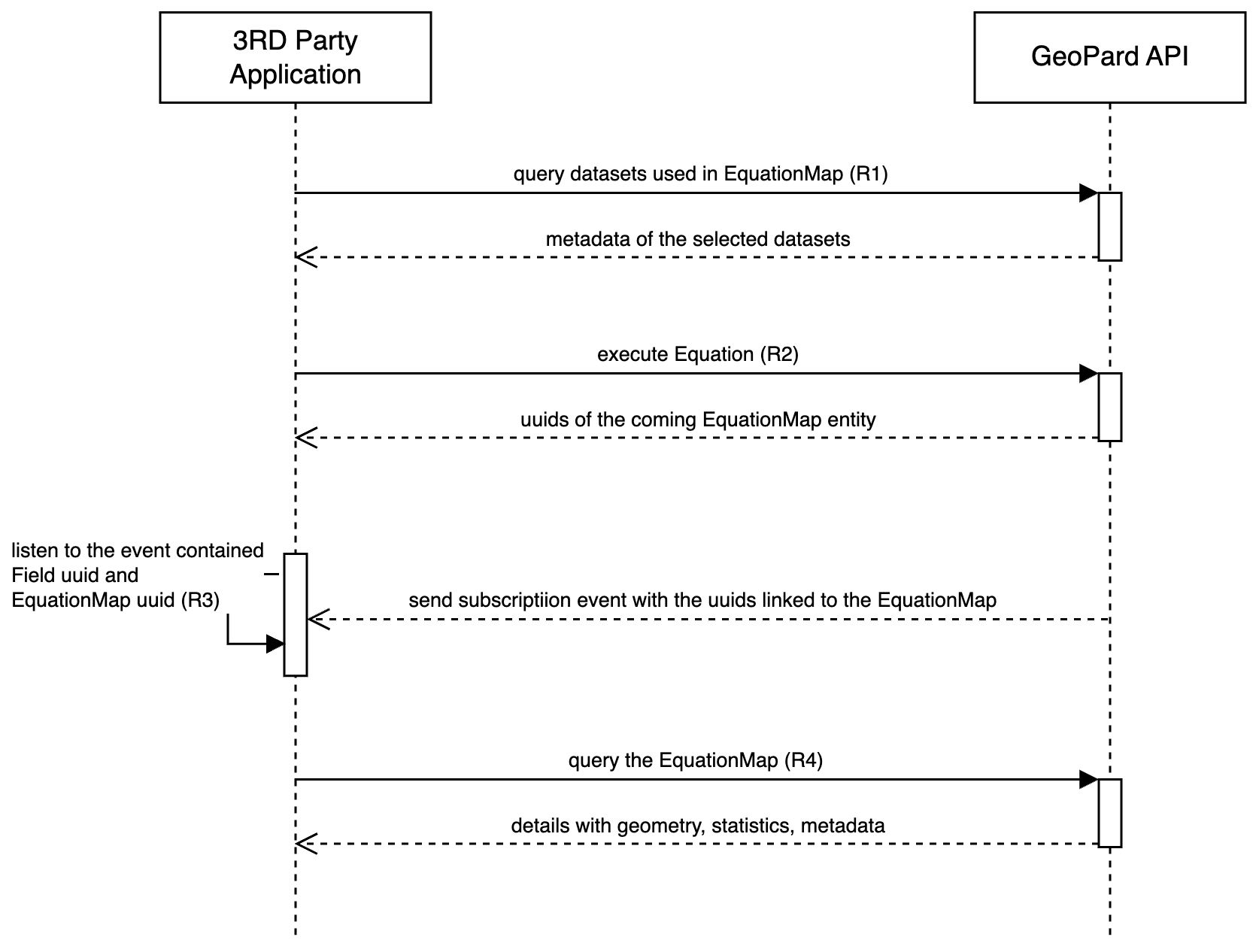
Az Egyenletek végrehajtása szekvenciadiagram bemutatja az egyenletek GeoPard-megoldáson belüli végrehajtásának folyamatát.
Általában azt javasoljuk, hogy a fiók vagy a szervezet szintjén előre elmentett egyenleteket használja. Egy egyenlet mindig más adathalmazokra mutató hivatkozásokat tartalmaz, például SoilDataset, AsAppliedDataset, YieldDataset, SatelliteImage és más adathalmazokra. Ezekből a kapcsolt adathalmazokból származó attribútumok változóként szerepelnek az egyenletben, ezért az adathalmazok részleteit előzetesen be kell gyűjteni. A leggyakrabban használt adathalmazok a SoilDatasets ([1. kérés vagy R1](https://docs.geopard.tech/geopard-tutorials/hu/api-dokumentacio/geopard-api-requests-overview/field-data/query-get-soildatasets.md)), az AsAppliedDataset ([1. kérés vagy R1](https://docs.geopard.tech/geopard-tutorials/hu/api-dokumentacio/geopard-api-requests-overview/field-data/query-get-asapplieddatasets.md)), valamint a YieldDataset ([1. kérés vagy R1](https://docs.geopard.tech/geopard-tutorials/hu/api-dokumentacio/geopard-api-requests-overview/field-data/query-get-yielddatasets.md)).
Az egyenlet végrehajtása aszinkron módon indul el. Az első kérés elindítja az egyenlet végrehajtását, és visszaadja a megfelelő EquationMap azonosítására szolgáló UUID-ket ([2. kérés vagy R2](https://docs.geopard.tech/geopard-tutorials/hu/api-dokumentacio/geopard-api-requests-overview/raster-and-equation-maps/mutation-generate-equationmap-asynchronously.md)). A végrehajtás összefoglalója WebSocketen keresztül, GraphQL-feliratkozási események formájában érkezik meg ([3. kérés vagy R3](https://docs.geopard.tech/geopard-tutorials/hu/api-dokumentacio/geopard-api-requests-overview/events/subscription-get-events.md)). Az esemény kézhezvétele után a GeoPard API-t használó alkalmazás olyan adatokat kérhet le, mint a metaadatok, a statisztikák és a geometriák ([4. kérés vagy R4](https://docs.geopard.tech/geopard-tutorials/hu/api-dokumentacio/geopard-api-requests-overview/raster-and-equation-maps/query-get-equationmap.md)).
A GeoPard eseményvezérelt architektúrája robusztus, hatékony és gyors reagálású rendszert biztosít az egyenletek végrehajtásához és eredményeik lekéréséhez.
Szekvenciadiagram: egyenlet végrehajtása
---
# Agent Instructions
This documentation is published with GitBook. GitBook is the documentation platform designed so that both humans and AI agents can read, navigate, and reason over technical content effectively. Learn more at gitbook.com.
## Querying This Documentation
If you need additional information that is not directly available in this page, you can query the documentation by asking a question.
Perform an HTTP GET request on the following URL with the `ask` and `goal` query parameters:
```
GET https://docs.geopard.tech/geopard-tutorials/hu/api-dokumentacio/diagrams-with-basic-flows/5.-execute-equations.md?ask=&goal=
```
`ask` is the immediate question: it should be specific, self-contained, and written in natural language.
`goal` is what the user is ultimately trying to achieve, the reason they need the answer. Sharing it helps GitBook give you a better, more relevant answer. A goal is most helpful when it describes the outcome the user wants rather than restating the question. For example, with `ask=how do I create an API token`, a goal like `automate deployments from our CI pipeline` lets GitBook tailor the answer to that use case.
The response will contain a direct answer to the question and relevant excerpts and sources from the documentation.
Use this mechanism when the answer is not explicitly present in the current page, you need clarification or additional context, or you want to retrieve related documentation sections.