> For the complete documentation index, see [llms.txt](https://docs.geopard.tech/geopard-tutorials/llms.txt). Markdown versions of documentation pages are available by appending `.md` to page URLs; this page is available as [Markdown](https://docs.geopard.tech/geopard-tutorials/hu/api-dokumentacio/diagrams-with-basic-flows/5.-execute-equations.md).
# 5. Egyenletek futtatása
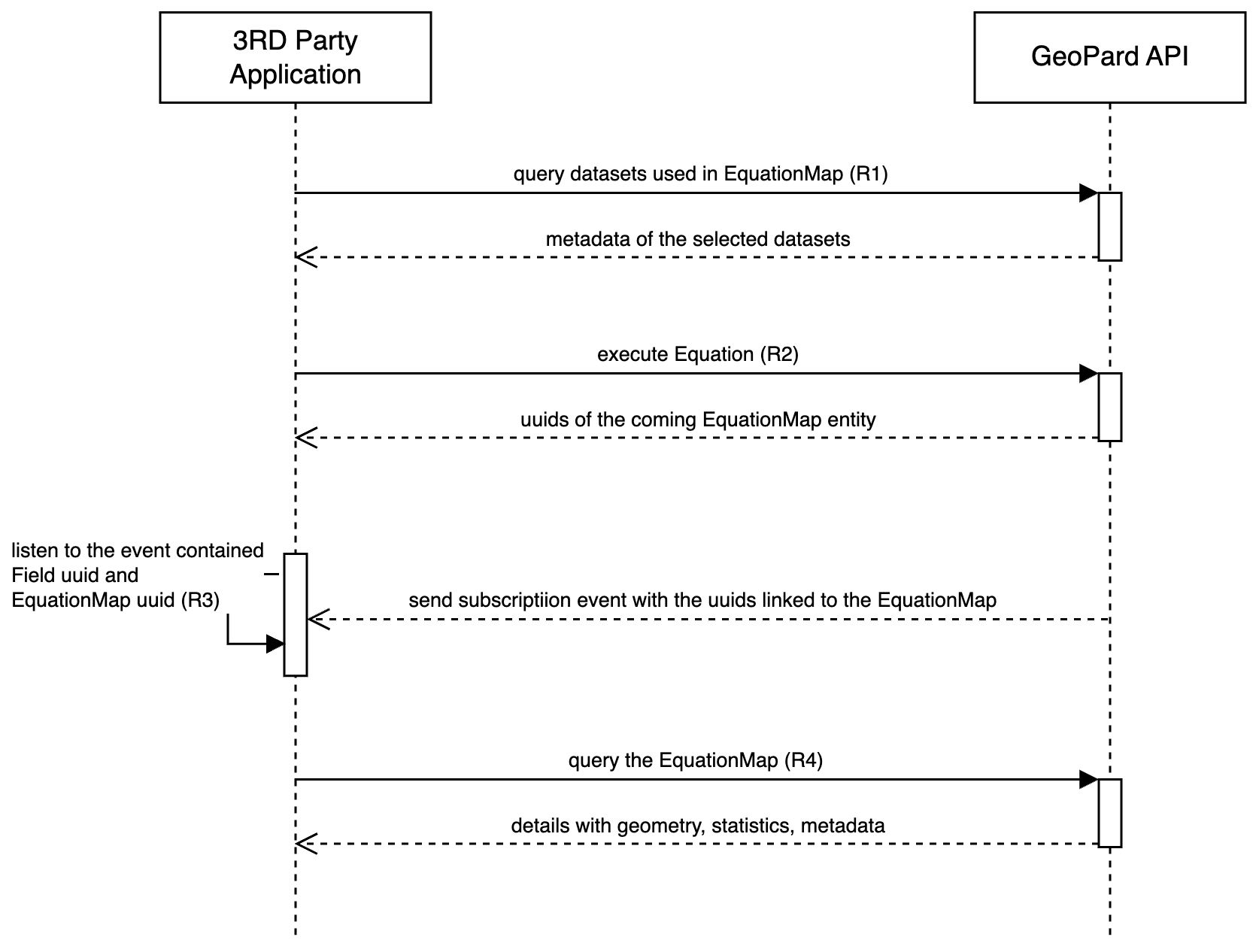
A Képletek végrehajtása szekvenciadiagram bemutatja a Képletek GeoPard-megoldáson belüli végrehajtásának folyamatát.
Általában érdemes a fiók vagy a szervezet szintjén előre elmentett Képleteket használni. A Képlet mindig más adathalmazokra mutató hivatkozásokat tartalmaz, például SoilDataset, AsAppliedDataset, YieldDataset, SatelliteImage stb. Ezekből a kapcsolt adathalmazokból származó attribútumok változóként szolgálnak a képletben, ezért az adathalmazok részleteit előre be kell gyűjteni. A leggyakrabban használt adathalmazok a SoilDatasets ([1. kérés vagy R1](https://docs.geopard.tech/geopard-tutorials/hu/api-dokumentacio/geopard-api-requests-overview/17.-query-get-soildatasets.md)), az AsAppliedDataset ([1. kérés vagy R1](https://docs.geopard.tech/geopard-tutorials/hu/api-dokumentacio/geopard-api-requests-overview/59.-query-get-asapplieddatasets.md)), valamint a YieldDataset ([1. kérés vagy R1](https://docs.geopard.tech/geopard-tutorials/hu/api-dokumentacio/geopard-api-requests-overview/16.-query-get-yielddatasets.md)).
A Képlet végrehajtása aszinkron módon indul. Az első kérés elindítja a Képlet végrehajtását, és visszaadja a megfelelő EquationMapet azonosító UUID-ket ([2. kérés vagy R2](https://docs.geopard.tech/geopard-tutorials/hu/api-dokumentacio/geopard-api-requests-overview/75.-mutation-generate-equationmap-asynchronously.md)). A végrehajtás összefoglalója GraphQL-előfizetési eseményeken keresztül, WebSocket-kapcsolaton érkezik ([3. kérés vagy R3](https://docs.geopard.tech/geopard-tutorials/hu/api-dokumentacio/geopard-api-requests-overview/1.-subscription-get-events.md)). Az esemény megérkezése után a GeoPard API-felhasználó lekérheti az olyan információkat, mint a metaadatok, statisztikák és geometriák ([4. kérés vagy R4](https://docs.geopard.tech/geopard-tutorials/hu/api-dokumentacio/geopard-api-requests-overview/76.-query-get-equationmap.md)).
A GeoPard eseményvezérelt architektúrája robusztus, hatékony és gyorsan reagáló rendszert biztosít a képletek végrehajtásához és az eredmények lekéréséhez.
Szekvenciadiagram: Képlet végrehajtása
---
# Agent Instructions
This documentation is published with GitBook. GitBook is the documentation platform designed so that both humans and AI agents can read, navigate, and reason over technical content effectively. Learn more at gitbook.com.
## Querying This Documentation
If you need additional information that is not directly available in this page, you can query the documentation by asking a question.
Perform an HTTP GET request on the following URL with the `ask` and `goal` query parameters:
```
GET https://docs.geopard.tech/geopard-tutorials/hu/api-dokumentacio/diagrams-with-basic-flows/5.-execute-equations.md?ask=&goal=
```
`ask` is the immediate question: it should be specific, self-contained, and written in natural language.
`goal` is what the user is ultimately trying to achieve, the reason they need the answer. Sharing it helps GitBook give you a better, more relevant answer. A goal is most helpful when it describes the outcome the user wants rather than restating the question. For example, with `ask=how do I create an API token`, a goal like `automate deployments from our CI pipeline` lets GitBook tailor the answer to that use case.
The response will contain a direct answer to the question and relevant excerpts and sources from the documentation.
Use this mechanism when the answer is not explicitly present in the current page, you need clarification or additional context, or you want to retrieve related documentation sections.