> For the complete documentation index, see [llms.txt](https://docs.geopard.tech/geopard-tutorials/llms.txt). Markdown versions of documentation pages are available by appending `.md` to page URLs; this page is available as [Markdown](https://docs.geopard.tech/geopard-tutorials/fin/tuote-esittely-verkkosovellus/vyohykekartat-ja-analytiikka/monivuotiset-vyohykkeet.md).
# Monivuotiset vyöhykkeet
Luo vakaita hallintavyöhykkeitä monivuotisen aineiston pohjalta pitkän aikavälin agronomisten päätösten tueksi.
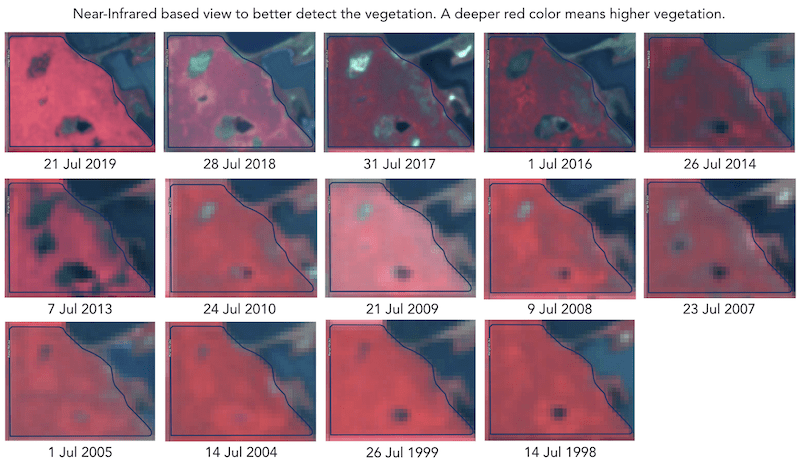
Historialliset (monivuotiset) hallintavyöhykkeet antavat tietoa jokaisesta kohdasta pellolla.
Historialliset (monivuotiset) hallintavyöhykkeet rakennetaan yli 30 vuoden satelliittikuvien arkiston perusteella. Jokaisen kasvukauden kasvillisuuden huippuvaiheen kuvat valitaan automaattisesti analytiikan syötteiksi. Muuten kukin tällainen kuva edustaa kyseisen vuoden mahdollista satokarttatiedostoa.
Pellon kasvuston kehityskaava auttaa tuntemaan maatalousalueen paremmin ja tekemään oikean päätöksen oikeilla panosmäärillä oikeissa kohdissa. Historiallisia hallintavyöhykkeitä voidaan käyttää mallina kylvön, lannoituksen ja vyöhykepohjaisen maanäytteenoton määritystiedostoille (Rx).
---
# Agent Instructions
This documentation is published with GitBook. GitBook is the documentation platform designed so that both humans and AI agents can read, navigate, and reason over technical content effectively. Learn more at gitbook.com.
## Querying This Documentation
If you need additional information that is not directly available in this page, you can query the documentation by asking a question.
Perform an HTTP GET request on the following URL with the `ask` and `goal` query parameters:
```
GET https://docs.geopard.tech/geopard-tutorials/fin/tuote-esittely-verkkosovellus/vyohykekartat-ja-analytiikka/monivuotiset-vyohykkeet.md?ask=&goal=
```
`ask` is the immediate question: it should be specific, self-contained, and written in natural language.
`goal` is what the user is ultimately trying to achieve, the reason they need the answer. Sharing it helps GitBook give you a better, more relevant answer. A goal is most helpful when it describes the outcome the user wants rather than restating the question. For example, with `ask=how do I create an API token`, a goal like `automate deployments from our CI pipeline` lets GitBook tailor the answer to that use case.
The response will contain a direct answer to the question and relevant excerpts and sources from the documentation.
Use this mechanism when the answer is not explicitly present in the current page, you need clarification or additional context, or you want to retrieve related documentation sections.