> For the complete documentation index, see [llms.txt](https://docs.geopard.tech/geopard-tutorials/llms.txt). Markdown versions of documentation pages are available by appending `.md` to page URLs; this page is available as [Markdown](https://docs.geopard.tech/geopard-tutorials/fin/gis-pikavinkit/qgis-laske-ndvi-drone-geotiff-tiedostolle.md).
# QGIS: Laske NDVI drone-Geotiff-tiedostolle
Joskus sinun täytyy laskea keskimääräinen NDVI jollekin lohkon sisällä olevalle polygonille. Voit tehdä seuraavasti QGIS-ohjelmassa.
#### 1 - Visualisoi alkuperäinen droonin NDVI-geotiffi
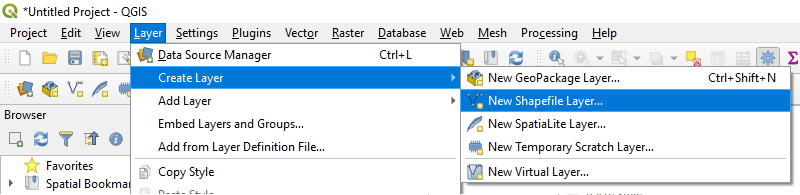
#### 2 - Luo uusi taso
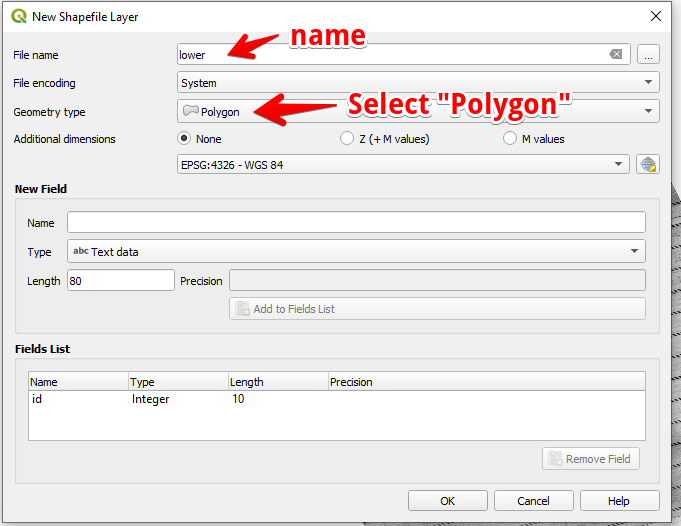
#### 3 - Määritä tason nimi ja geometria-tyyppi ja paina OK
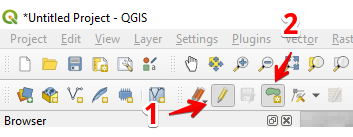
#### 4 - Valitse taso Tasot-paneelissa
1. Valitse “Kytke muokkaus päälle” (1)
2. Valitse “Lisää polygonikohde” (2)
#### 5 - Piirrä polygoni. Viimeistele piirto painamalla hiiren oikeaa painiketta ja aseta ponnahdusikkunassa “id”.
Viimeistele taso painamalla uudelleen “Kytke muokkaus päälle” ja paina “Tallenna”.
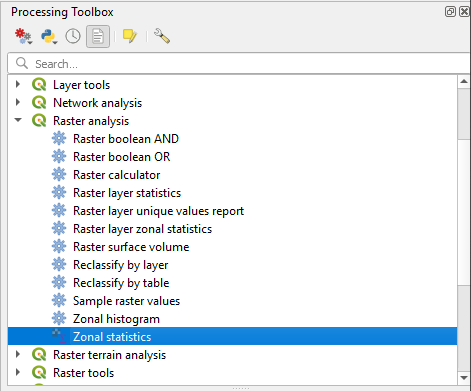
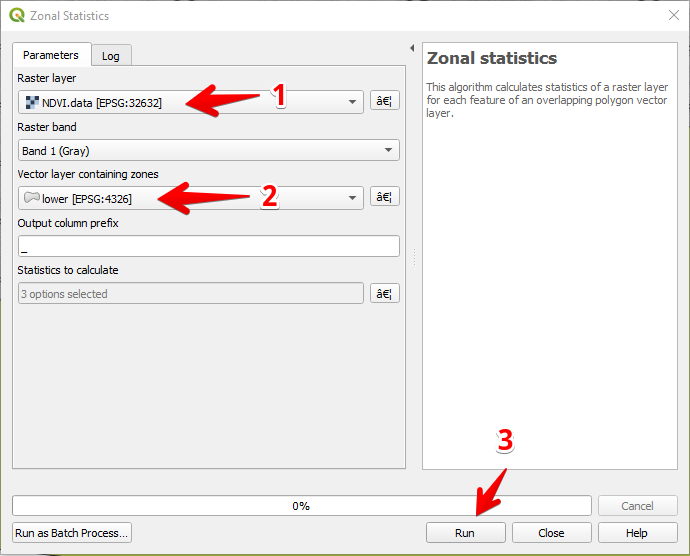
#### 6 - Valitse vyöhyketilastot “Processing toolbox” -paneelissa.
#### 7 - Valitse rasteritaso (1),
Valitse polygonitaso (2),
Paina “Suorita” (3).
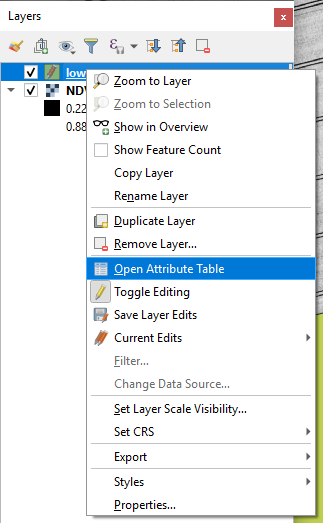
#### 8 - Valitse taso Tasot-paneelissa ja paina hiiren oikeaa painiketta; valitse pikavalikosta Avaa ominaisuustaulukko.
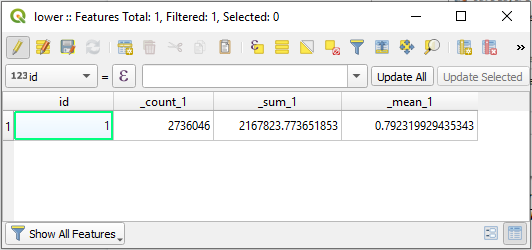
#### 9 - Lasketut tilastot näkyvät taulukossa.
---
# Agent Instructions
This documentation is published with GitBook. GitBook is the documentation platform designed so that both humans and AI agents can read, navigate, and reason over technical content effectively. Learn more at gitbook.com.
## Querying This Documentation
If you need additional information that is not directly available in this page, you can query the documentation by asking a question.
Perform an HTTP GET request on the following URL with the `ask` and `goal` query parameters:
```
GET https://docs.geopard.tech/geopard-tutorials/fin/gis-pikavinkit/qgis-laske-ndvi-drone-geotiff-tiedostolle.md?ask=&goal=
```
`ask` is the immediate question: it should be specific, self-contained, and written in natural language.
`goal` is what the user is ultimately trying to achieve, the reason they need the answer. Sharing it helps GitBook give you a better, more relevant answer. A goal is most helpful when it describes the outcome the user wants rather than restating the question. For example, with `ask=how do I create an API token`, a goal like `automate deployments from our CI pipeline` lets GitBook tailor the answer to that use case.
The response will contain a direct answer to the question and relevant excerpts and sources from the documentation.
Use this mechanism when the answer is not explicitly present in the current page, you need clarification or additional context, or you want to retrieve related documentation sections.