> For the complete documentation index, see [llms.txt](https://docs.geopard.tech/geopard-tutorials/llms.txt). Markdown versions of documentation pages are available by appending `.md` to page URLs; this page is available as [Markdown](https://docs.geopard.tech/geopard-tutorials/dnk/produktguide-webapp/john-deere-operations-center-integration.md).

# John Deere Operations Center-integration

GeoPard har en førsteklasses, automatisk tovejsintegration med John Deere Operations Center.

Hvis du har en John Deere Operations Center-konto, kan du nemt integrere den med GeoPard og få adgang til flere funktioner og fordele. For at komme i gang, gå til <mark style="color:blå;">app.geopard.tech</mark> og tilmeld dig en gratis prøveperiode, som omfatter 100 hektar (250 acres) dækning.

<figure><img src="https://1581835146-files.gitbook.io/~/files/v0/b/gitbook-x-prod.appspot.com/o/spaces%2FYICBELdyAXXebKAzfLOR%2Fuploads%2FeuyIJg5ilPzLEn0FQgDq%2FGeoPard%20-%20Ops%20Center%20Connected.png?alt=media&amp;token=1b363e2d-5daf-4c03-84fc-8d110161efdd" alt=""><figcaption><p>GeoPard giver MyJohnDeere Operations Center-brugere (landmænd og forhandlere) adgang til avanceret automatiseret analyse</p></figcaption></figure>

Når du har oprettet din konto, kan du nemt forbinde dine MyJohnDeere-organisationer og synkronisere vigtige data, såsom markoplysninger, høstdata, udført behandling, såning og jordbearbejdningsjournaler. Derudover kan du oprette tildelingskort og sende billeder, topografi- og jorddata direkte til John Deere Operations Center, hvilket yderligere forbedrer din drift på gården.

Hvis du foretrækker at bruge [app.geopard.tech](https://app.geopard.tech), kan du stadig få samme grad af integration med John Deere Operations Center. Bemærk dog, at gratis prøveperioden ikke er tilgængelig i dette tilfælde.

Ved at integrere GeoPard med din John Deere Operations Center-konto kan du udnytte styrken i begge platforme til at optimere din landbrugsdrift og træffe mere velinformerede beslutninger på baggrund af omfattende, opdaterede data.

### Synkroniseringstidspunkt

Synkronisering er hændelsesstyret, ikke tidsplanlagt. John Deere giver GeoPard besked, når en ny operation dukker op.

GeoPard anmoder om arkivet. John Deere genererer det. GeoPard importerer det, når det er klart. GeoPard tjekker, om arkivet er klar, hvert 20. minut.

GeoPard prøver igen i op til 24 timer. Det giver op til 72 tjek af, om arkivet er klar.

| Arkivstatus                                       | Tid til GeoPard    |
| ------------------------------------------------- | ------------------ |
| Lille arkiv                                       | 15–50 minutter     |
| Stort arkiv                                       | Op til 2 timer     |
| Belastning i højsæsonen hos John Deere (sjældent) | Op til en halv dag |

Ventetiden skyldes, at John Deere skal generere arkivet. GeoPard kører ikke et dagligt batch-job. Der kræves ingen konfiguration.

Du kan til enhver tid importere data manuelt igen. Hvis en operation stadig mangler efter 24 timer, så bekræft, at den er afsluttet og uploadet i Operations Center. Ellers kontakt support.

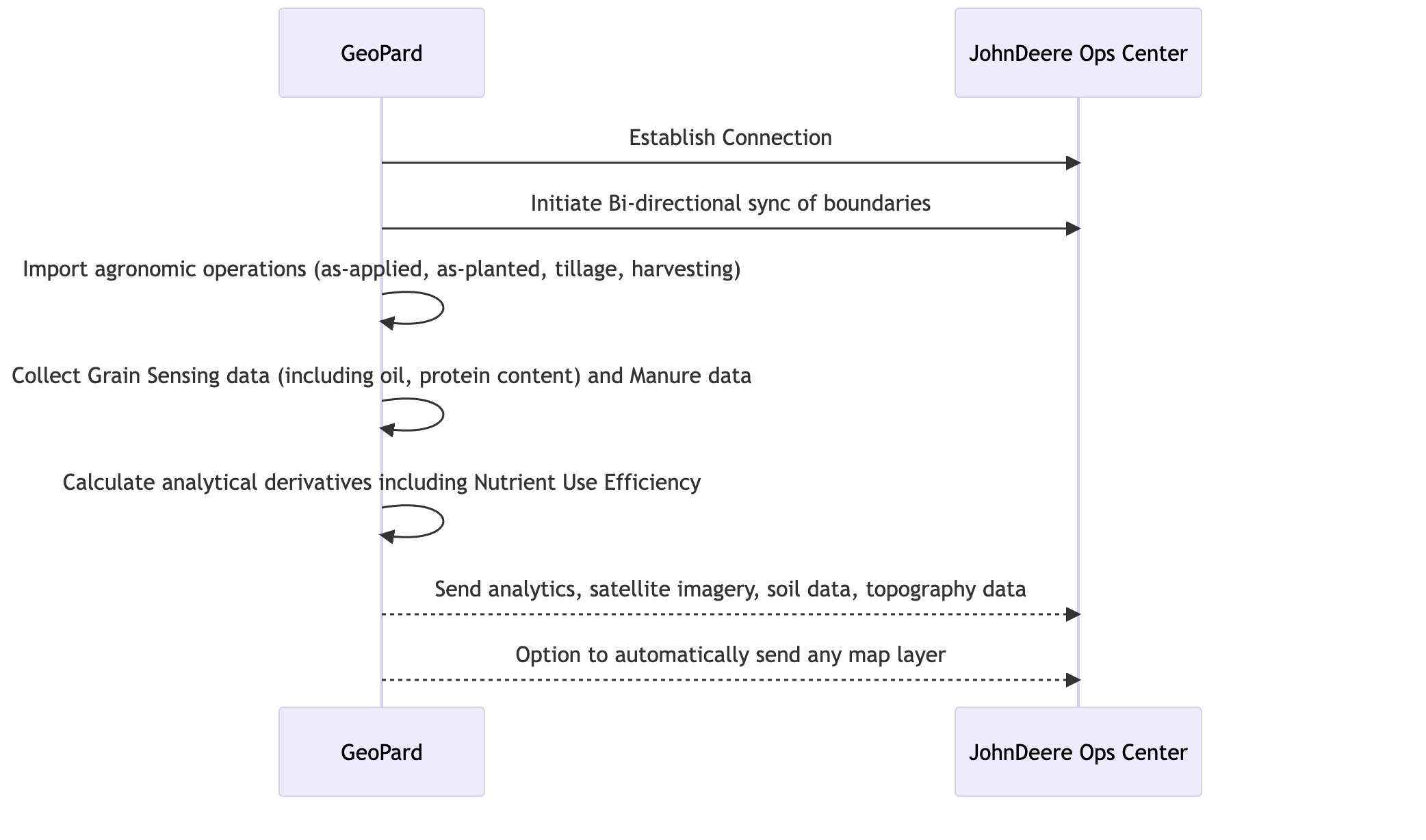
### Skematisk oversigt over integrationen

<figure><img src="https://1581835146-files.gitbook.io/~/files/v0/b/gitbook-x-prod.appspot.com/o/spaces%2FYICBELdyAXXebKAzfLOR%2Fuploads%2FFZhSfpU72m5pJpKW4SE9%2FScreenshot%202023-06-27%20at%2016.18.10.png?alt=media&amp;token=73e2114e-6453-4689-b230-fcf9094ac25b" alt=""><figcaption><p>Sekvensdiagram, der illustrerer integrationsprocessen mellem GeoPard og JohnDeere Ops Center</p></figcaption></figure>

### Funktioner understøttet af den automatiserede tovejsintegration

1. [Forbind til MyJohnDeere Operations Center](/geopard-tutorials/dnk/produktguide-webapp/john-deere-operations-center-integration/2.-forbind-til-john-deere-operations-center.md) med GeoPard
2. [Forbind til MyJohnDeere-organisationer](/geopard-tutorials/dnk/produktguide-webapp/john-deere-operations-center-integration/3.-forbind-til-john-deere-organisationer.md)
3. [Importer fra MyJohnDeere Operations Center ](/geopard-tutorials/dnk/produktguide-webapp/john-deere-operations-center-integration/4.-importer-til-geopard-fra-john-deere-operations-center.md)til GeoPard
   * Markgrænser
   * Operationskort
     * *Såning (som sået)*
     * *Som udført: Anvendelse* af anvendt gødning/afgrødebeskyttelse/vækstregulatorer
     * *GrainSensing-data*, inklusive protein- og olieindhold fra [John Deere HarvestLab™ 3000](https://www.deere.com/en/technology-products/precision-ag-technology/data-management/harvest-lab-constituent-sensing/)
     * *Gødningsdata*
     * *Høst*
     * *Jordbearbejdning*
     * *Det komplette historiske arkiv*
4. Eksporter fra GeoPard til John Deere Operations Center
   * [Markgrænser](/geopard-tutorials/dnk/produktguide-webapp/john-deere-operations-center-integration/7.-eksporter-markgraenser-til-john-deere-operations-center.md)
   * [Synkroniser en mark med John Deere Operations Center](/geopard-tutorials/dnk/produktguide-webapp/john-deere-operations-center-integration/11.-synkroniser-en-mark-med-john-deere-operations-center.md)
   * [VRA-kort som arbejdsplaner](/geopard-tutorials/dnk/produktguide-webapp/john-deere-operations-center-integration/8.-eksporter-rx-kort-til-john-deere-operations-center-som-arbejdsplaner.md) til
     * Rx-såning
     * Rx-gødning (kommer)
     * Afgrødebeskyttelse (kommer)
     * Vækstregulatorer (kommer)
   * [VRA-kort som filer](/geopard-tutorials/dnk/produktguide-webapp/john-deere-operations-center-integration/6.-eksporter-rx-kort-til-john-deere-operations-center-som-filer.md) til
     * Rx-såning
     * Rx-gødning
     * Afgrødebeskyttelse
     * Vækstregulatorer
   * Styringszoner (f.eks. markpotentialekort)
   * Topografikort baseret på LIDAR- eller GPS-data
   * Jordkort fra prøvetagning eller scanning ([Elektrisk ledningsevne](https://geopard.tech/blog/k9s011204i-high-density-sensor-data/), Veris/EM38/DualEM, [SoilOptix](https://geopard.tech/blog/brrck2udr1-soiloptix-data-analysis-in-precision-agr/), [TopSoilMapper](https://geopard.tech/blog/agte3p8ec1-analyze-geoprospectors-topsoilmapper-dat/)).
   * Satellitbilleder med RGB, NIR og kontrast-/forstærket vegetation fra leverandører som Landsat, Sentinel og Planet
   * Ligningsbaseret analyse; [flere detaljer](https://geopard.tech/blog/equation-based-analytics-precision/) om NUE, ROI-kort og beregning af mål kontra udført
5. [Automatisk datasynkronisering](/geopard-tutorials/dnk/produktguide-webapp/john-deere-operations-center-integration/5.-konfigurer-automatisk-datasynkronisering.md)\
   Følgende funktioner kan konfigureres enkeltvis på John Deere-integrationssiden i GeoPard.
   * GeoPard lytter løbende efter nyindsamlede operationskort: det downloader dem automatisk og knytter dem til de eksisterende markgrænser.\
     Blandt de sporbare operationskort er der *Såning*, *Anvendelse*, *Høst*, og *Jordbearbejdning*.
   * GeoPard sender alle ændringer af *Markgrænser* som brugeren har foretaget, tilbage til Ops Center.
   * GeoPard sender *Topografikort*, *Jordkort* fra prøver og scannere, *Styringszoner*, og *Ligningskort* som visuelle kortlag til John Deere Operations Center.
6. Dataforbindelse med Climate FieldView\
   Den omfatter næsten realtidsdataudveksling mellem GeoPard og FieldView via John Deere Operations Center. GeoPard indsamler operationer, der er gemt i FieldView, inklusive det historiske arkiv, og sender markgrænser og VRA-kort.


---

# Agent Instructions
This documentation is published with GitBook. GitBook is the documentation platform designed so that both humans and AI agents can read, navigate, and reason over technical content effectively. Learn more at gitbook.com.

## Querying This Documentation
If you need additional information that is not directly available in this page, you can query the documentation by asking a question.

Perform an HTTP GET request on the following URL with the `ask` and `goal` query parameters:

```
GET https://docs.geopard.tech/geopard-tutorials/dnk/produktguide-webapp/john-deere-operations-center-integration.md?ask=<question>&goal=<user_goal>
```

`ask` is the immediate question: it should be specific, self-contained, and written in natural language.
`goal` is what the user is ultimately trying to achieve, the reason they need the answer. Sharing it helps GitBook give you a better, more relevant answer. A goal is most helpful when it describes the outcome the user wants rather than restating the question. For example, with `ask=how do I create an API token`, a goal like `automate deployments from our CI pipeline` lets GitBook tailor the answer to that use case.

The response will contain a direct answer to the question and relevant excerpts and sources from the documentation.

Use this mechanism when the answer is not explicitly present in the current page, you need clarification or additional context, or you want to retrieve related documentation sections.