> For the complete documentation index, see [llms.txt](https://docs.geopard.tech/geopard-tutorials/llms.txt). Markdown versions of documentation pages are available by appending `.md` to page URLs; this page is available as [Markdown](https://docs.geopard.tech/geopard-tutorials/dnk/api-dokumentation/kom-godt-i-gang-med-geopard-apiet.md).
# Kom godt i gang med GeoPard API'et
GeoPard-teamet anbefaler på det kraftigste at starte med Altair for grundigt at gennemgå funktionerne i GeoPard API’et. Den henter konsekvent den nyeste version af tilgængelige entiteter, forespørgsler, mutationer og abonnementer. Se venligst hurtigstartguiden nedenfor:
1. Installer Altair GraphQL Chrome-udvidelsen fra denne [LINK](https://chrome.google.com/webstore/detail/altair-graphql-client/flnheeellpciglgpaodhkhmapeljopja) eller brug alternativt Altair GraphQL Client direkte i [din browser](https://altairgraphql.dev/).
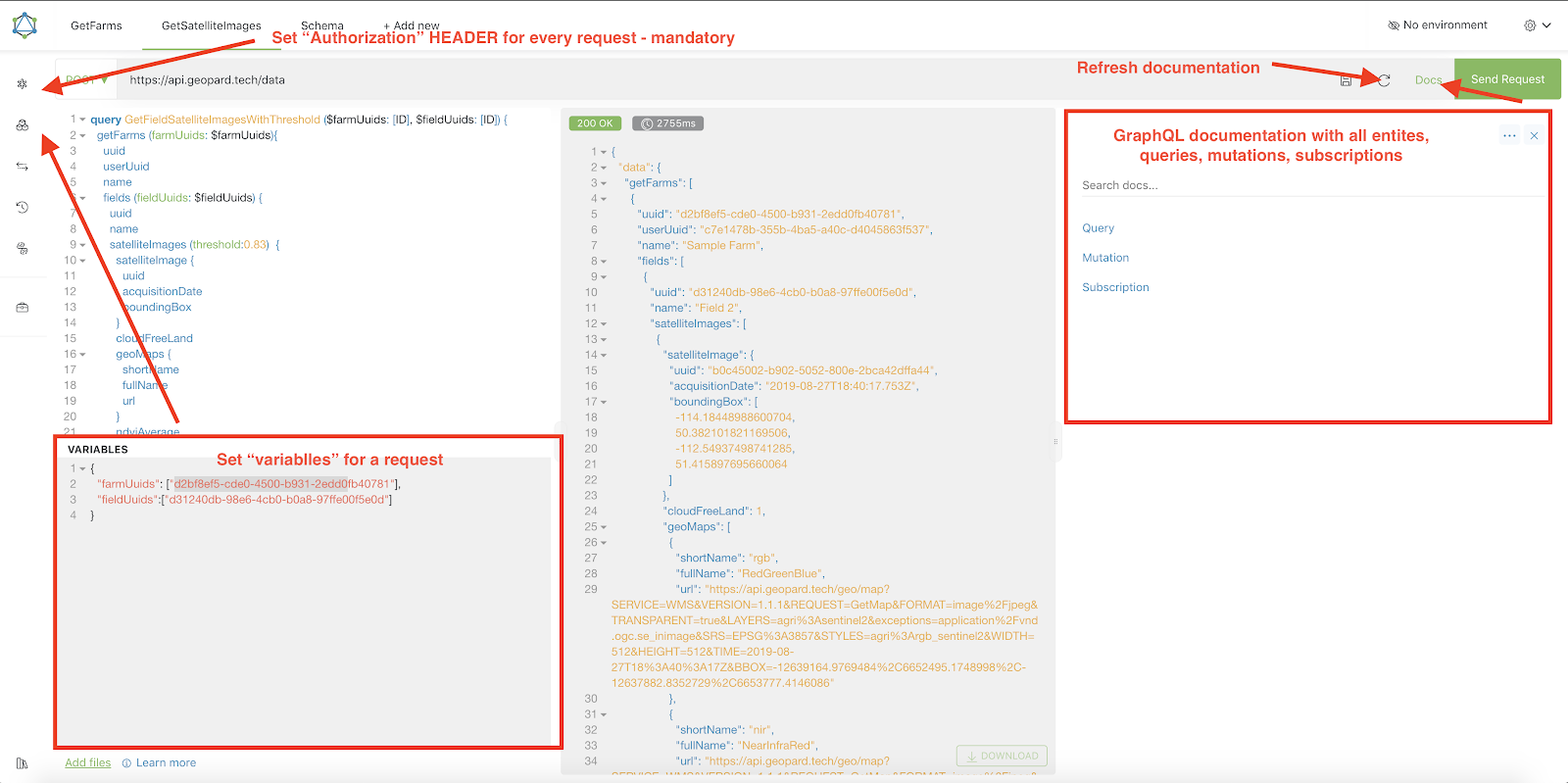
2. Hver anmodning skal autentificeres med en `Authorization` HEADER, hvor det nødvendige token skal medtages. Til hurtig test kan `Authorization` HEADER-værdien hentes fra anmodningerne efter login i GeoPard Agriculture.\
\&#xNAN;*En kort forklaring findes på skærmbilledet nedenfor.*
3. GraphQL-root-endpointet findes på [`https://api.geopard.tech/data`](https://api.geopard.tech/data).\
\&#xNAN;*En kort forklaring findes på skærmbilledet nedenfor.*
4. Adgang til GraphQL-skemaet findes under knappen "Docs" i Altair-grænsefladen. Dette afsnit giver dig mulighed for at navigere gennem alle tilgængelige Queries, Mutations og Subscriptions. Derudover giver det indsigt i forskellige entiteter og deres respektive strukturer, hvilket giver en omfattende forståelse af systemets GraphQL-opsætning.\
\&#xNAN;*En kort forklaring findes på skærmbilledet nedenfor.*
5. Bekræft, at udgående anmodninger fungerer korrekt ved hjælp af din browsers udviklingskonsol. Du kan anvende anmodningsfiltre såsom `/data`.
6. Skemaet kan tilgås fra denne [HER](/geopard-tutorials/dnk/api-dokumentation/geopard-api-dataskema.md).
7. Til filupload bruger vi [disse endepunkter](/geopard-tutorials/dnk/api-dokumentation/overblik-over-geopard-api-anmodninger/55.-upload-zip-filer-over-6-mb.md).
8. For at få adgang til raster- og vektordata bruger vi OGC WMS (rasterbilleder til hurtig rendering) og WFS-formater (`shp`, `geojson` ). For mere information henvises der til vores [Geo Endpoint](/geopard-tutorials/dnk/api-dokumentation/geo-endpoints-til-adgang-til-spatiale-data.md)-afsnit.
{% hint style="info" %}
En kort guide med tips til, hvordan du bruger Altair, er fremhævet på skærmbilledet nedenfor.
{% endhint %}
Altrair: Kort guide
---
# Agent Instructions
This documentation is published with GitBook. GitBook is the documentation platform designed so that both humans and AI agents can read, navigate, and reason over technical content effectively. Learn more at gitbook.com.
## Querying This Documentation
If you need additional information that is not directly available in this page, you can query the documentation by asking a question.
Perform an HTTP GET request on the following URL with the `ask` and `goal` query parameters:
```
GET https://docs.geopard.tech/geopard-tutorials/dnk/api-dokumentation/kom-godt-i-gang-med-geopard-apiet.md?ask=&goal=
```
`ask` is the immediate question: it should be specific, self-contained, and written in natural language.
`goal` is what the user is ultimately trying to achieve, the reason they need the answer. Sharing it helps GitBook give you a better, more relevant answer. A goal is most helpful when it describes the outcome the user wants rather than restating the question. For example, with `ask=how do I create an API token`, a goal like `automate deployments from our CI pipeline` lets GitBook tailor the answer to that use case.
The response will contain a direct answer to the question and relevant excerpts and sources from the documentation.
Use this mechanism when the answer is not explicitly present in the current page, you need clarification or additional context, or you want to retrieve related documentation sections.