> For the complete documentation index, see [llms.txt](https://docs.geopard.tech/geopard-tutorials/llms.txt). Markdown versions of documentation pages are available by appending `.md` to page URLs; this page is available as [Markdown](https://docs.geopard.tech/geopard-tutorials/dnk/aendringslog-and-produktudgivelser/udgivelse-til-web-august-2024-forhandsvisninger-af-datalag-rumligt-lokaliserede-zoner-genanvendelige.md).
# Udgivelse til web august 2024 (forhåndsvisninger af datalag, rumligt lokaliserede zoner, genanvendelige zoner)
Denne opdatering forbedrer forhåndsvisninger af datalag i oprettelse af zonekort og tilføjer understøttelse af op til 50 rumligt lokaliserede zoner.
### Forbedrede forhåndsvisninger af datalag i oprettelse af zonekort
Når du nu opretter zonekort, kan du forhåndsvise de datalag, du har valgt, herunder satellitbilleder og datasæt som jord, udbytte og sprøjtet. I trinnet Datalag i oprettelsen af zonekort ser du miniatureforhåndsvisninger af disse lag nederst på siden. Hver forhåndsvisning har en etiket med datoen for satellitbilledet eller navnet på datasættet. Du kan også fjerne lag eller åbne flere detaljer via værktøjstip. Det aktive satellitbillede eller navnet på datasættet vises over kortet, så det er nemmere at holde styr på dine valg.
### Opdaterede kontroller til generering af rumligt lokaliserede zonekort
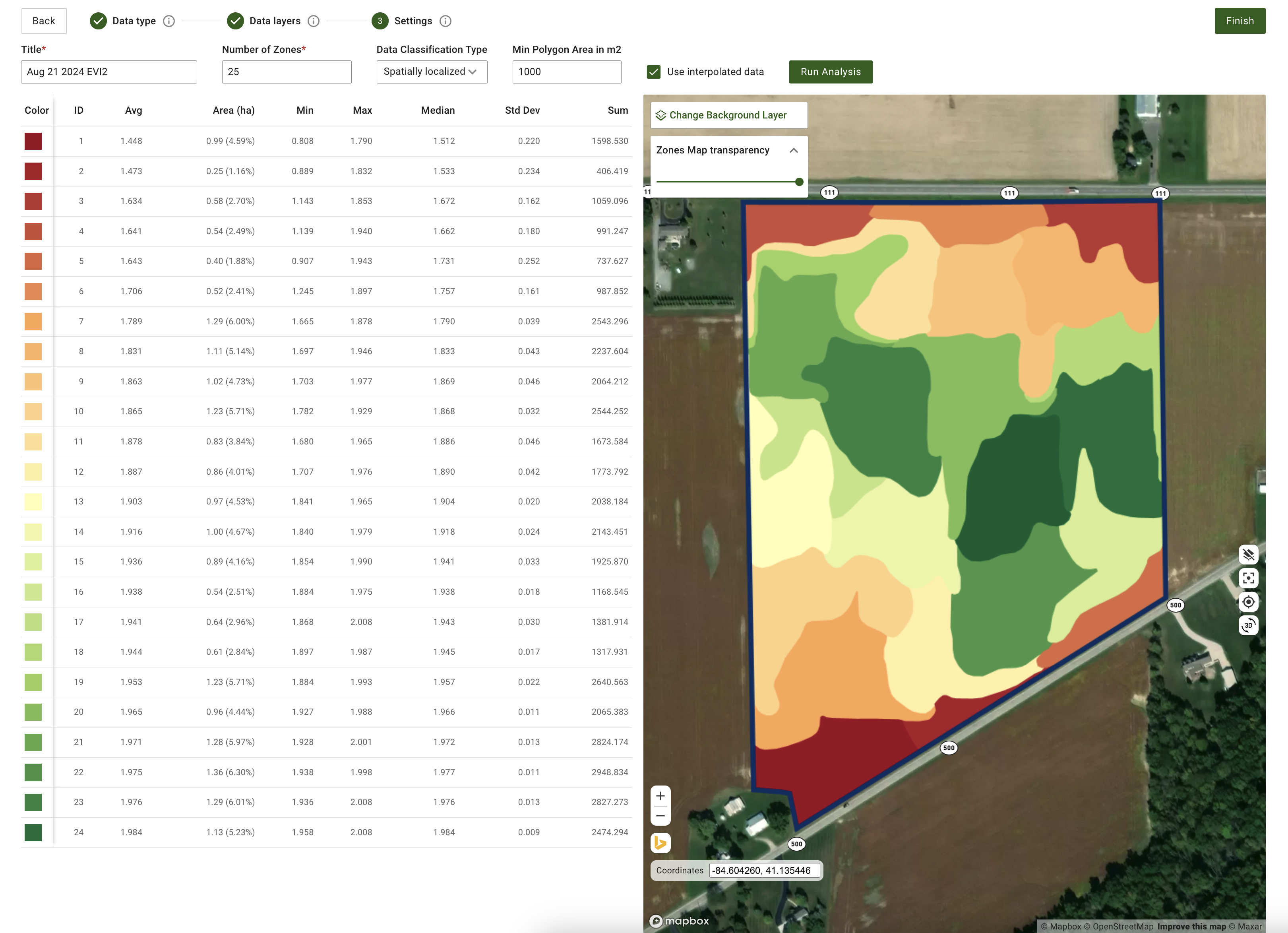
Vi har tilføjet mere fleksibilitet i genereringen af rumligt lokaliserede zoner. Systemet understøtter nu oprettelse af mere end 11 zoner, med et interval fra 3 til 50 zoner. Indtast blot det ønskede antal zoner direkte i inputfeltet. Denne opdatering giver mere finmasket styring og sikrer tilstrækkelig geospatial granularitet.
Opdaterede kontroller til generering af rumligt lokaliserede zonekort
### Yderligere forbedringer og rettelser
Ud over disse funktioner fortsætter softwareingeniørteamet med at forbedre GeoPard-kernen. Denne måned omfatter disse forbedringer udvidet dækning af automatiserede tests og finjusteret cloud-infrastruktur for at forbedre den samlede ydeevne.
---
# Agent Instructions
This documentation is published with GitBook. GitBook is the documentation platform designed so that both humans and AI agents can read, navigate, and reason over technical content effectively. Learn more at gitbook.com.
## Querying This Documentation
If you need additional information that is not directly available in this page, you can query the documentation by asking a question.
Perform an HTTP GET request on the following URL with the `ask` and `goal` query parameters:
```
GET https://docs.geopard.tech/geopard-tutorials/dnk/aendringslog-and-produktudgivelser/udgivelse-til-web-august-2024-forhandsvisninger-af-datalag-rumligt-lokaliserede-zoner-genanvendelige.md?ask=&goal=
```
`ask` is the immediate question: it should be specific, self-contained, and written in natural language.
`goal` is what the user is ultimately trying to achieve, the reason they need the answer. Sharing it helps GitBook give you a better, more relevant answer. A goal is most helpful when it describes the outcome the user wants rather than restating the question. For example, with `ask=how do I create an API token`, a goal like `automate deployments from our CI pipeline` lets GitBook tailor the answer to that use case.
The response will contain a direct answer to the question and relevant excerpts and sources from the documentation.
Use this mechanism when the answer is not explicitly present in the current page, you need clarification or additional context, or you want to retrieve related documentation sections.