> For the complete documentation index, see [llms.txt](https://docs.geopard.tech/geopard-tutorials/llms.txt). Markdown versions of documentation pages are available by appending `.md` to page URLs; this page is available as [Markdown](https://docs.geopard.tech/geopard-tutorials/de/api-dokumentation/diagrams-with-basic-flows/2.-graphql-subscription.md).
# 2. GraphQL-Subscription
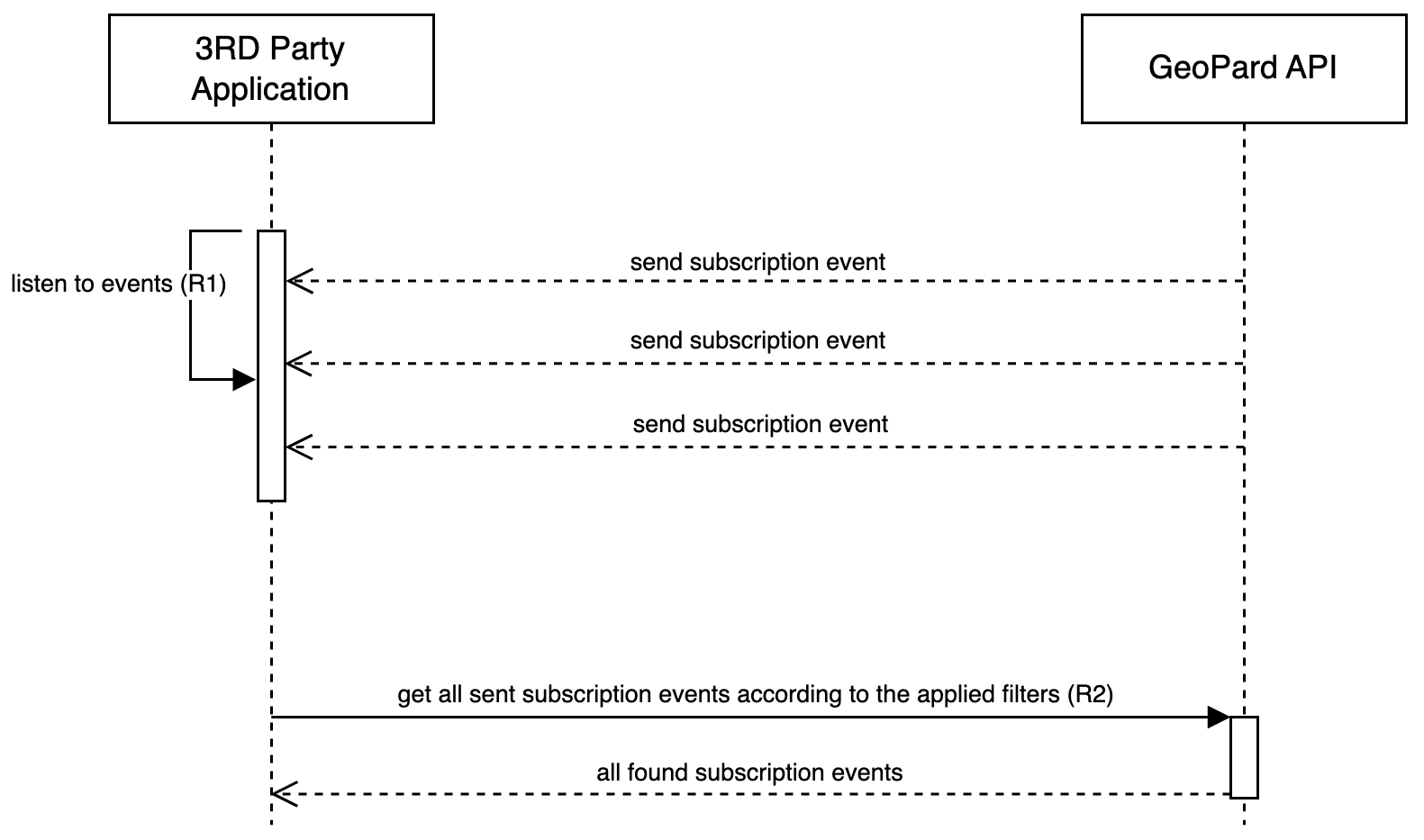
Das Sequenzdiagramm für GraphQL-Subscriptions veranschaulicht, wie Sie von der ereignisgesteuerten Architektur im GeoPard-Kern profitieren. Bei Änderungen an verknüpften Entitäten
löst die GeoPard API umgehend ein Ereignis aus, das die betroffenen Entitäten und den entsprechenden Vorgang erfasst (`INSERT`, `MODIFY`, `REMOVE`). Der Umfang dieser Subscriptions ist groß und umfasst alle Entitäten, z. B. Farm, Field, SatelliteImage, SoilDataset, AsAppliedDataset, YieldDataset, TopographyMap, Notes usw.
Die GraphQL-Subscription ([Anfrage 1 oder R1](https://docs.geopard.tech/geopard-tutorials/de/api-dokumentation/geopard-api-requests-overview/1.-subscription-get-events.md)) läuft über eine WebSocket-Verbindung, über die nahezu in Echtzeit alle Ereignisse zugestellt werden. So werden Änderungen umgehend kommuniziert.
{% hint style="danger" %}
Der Empfänger der Subscription-Ereignisse sollte als einfacher Dienst fungieren, der die empfangenen Ereignisse an einen nachgelagerten Dienst weiterleitet, in dem die Verarbeitungslogik angewendet wird. Wichtig ist, dass dieser Empfänger selbst keine Verarbeitung durchführt.
{% endhint %}
Sollten Ereignisse verpasst werden oder verloren gehen, können Nutzer sie außerdem abrufen. Dazu wird eine GraphQL-Abfrage für einen bestimmten Zeitraum und bestimmte Entitäten (User, Farm, Field) ausgeführt, sodass vergangene Ereignisse vollständig wiederhergestellt werden können ([Anfrage 2 oder R2](https://docs.geopard.tech/geopard-tutorials/de/api-dokumentation/geopard-api-requests-overview/82.-query-restore-subscription-events.md)). Diese Funktionalität stellt sicher, dass keine Informationen verloren gehen, und gewährleistet die Integrität und Konsistenz der Nutzerdaten.
Sequenzdiagramm: Mit Subscription-Ereignissen arbeiten
---
# Agent Instructions
This documentation is published with GitBook. GitBook is the documentation platform designed so that both humans and AI agents can read, navigate, and reason over technical content effectively. Learn more at gitbook.com.
## Querying This Documentation
If you need additional information that is not directly available in this page, you can query the documentation by asking a question.
Perform an HTTP GET request on the following URL with the `ask` and `goal` query parameters:
```
GET https://docs.geopard.tech/geopard-tutorials/de/api-dokumentation/diagrams-with-basic-flows/2.-graphql-subscription.md?ask=&goal=
```
`ask` is the immediate question: it should be specific, self-contained, and written in natural language.
`goal` is what the user is ultimately trying to achieve, the reason they need the answer. Sharing it helps GitBook give you a better, more relevant answer. A goal is most helpful when it describes the outcome the user wants rather than restating the question. For example, with `ask=how do I create an API token`, a goal like `automate deployments from our CI pipeline` lets GitBook tailor the answer to that use case.
The response will contain a direct answer to the question and relevant excerpts and sources from the documentation.
Use this mechanism when the answer is not explicitly present in the current page, you need clarification or additional context, or you want to retrieve related documentation sections.