> For the complete documentation index, see [llms.txt](https://docs.geopard.tech/geopard-tutorials/llms.txt). Markdown versions of documentation pages are available by appending `.md` to page URLs; this page is available as [Markdown](https://docs.geopard.tech/geopard-tutorials/cze/prohlidka-produktu-webova-aplikace/zonove-mapy-a-analyzy/vytvorit-zonovou-mapu-ze-satelitnich-snimku.md).
# Vytvořit zónovou mapu ze satelitních snímků
Vytvořte management zóny ze satelitních snímků, abyste zachytili variabilitu a vedli rozhodování o variabilních dávkách.
1. Vyberte pole v seznamu a klikněte na **Vytvořit mapu zón** tlačítko, vyberte **Jednovrstvá**, a potom klikněte na **Další**.
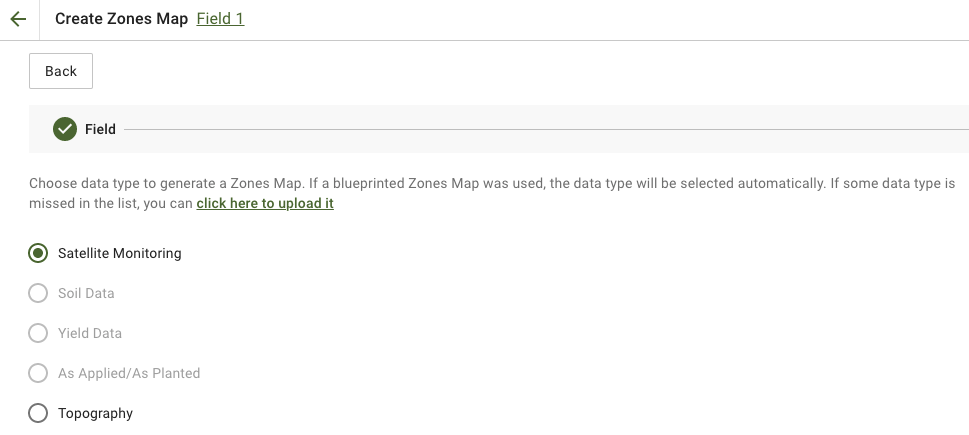
2. Vyberte **Satelitní sledování** typ dat a pokračujte.
3. V dalším kroku můžete vybrat satelitní snímek. Můžete filtrovat podle měsíce, roku, poskytovatele nebo NDVI a přepínat mezi zobrazeními snímků, jako jsou NIR a EVI2. Ten **Zde je stručný popis typů indexů** odkaz vysvětluje dostupné indexy. Pokud potřebujete změnit index, klikněte na šipku vedle **EVI2**. Poté klikněte **Další**.
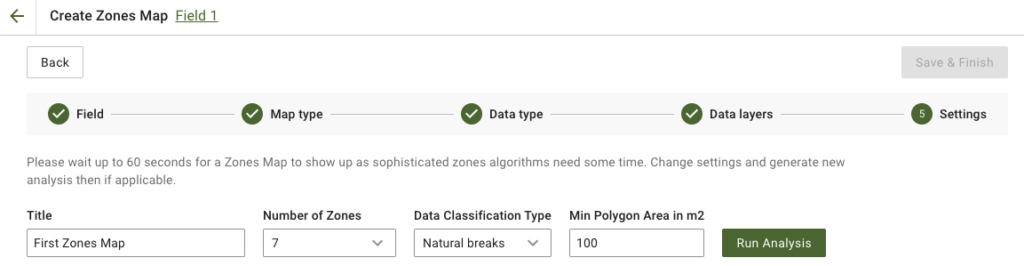
4. V dalším kroku můžete upravit název, změnit počet zón, [vybrat typ klasifikace dat](/geopard-tutorials/cze/prohlidka-produktu-webova-aplikace/zonove-mapy-a-analyzy/pouziti-klasifikace-dat.md), a určit minimální plochu polygonu v metrech čtverečních. Klikněte na **Spustit analýzu** pro pokračování.
Analýza může běžet až 60 sekund v závislosti na parametrech, které jste zadali.
5. Až bude hotová, klikněte na **Uložit a dokončit**.
Po uložení se zobrazí následující zpráva:
Můžete vytvořit další mapu zón, přiřadit dávky nebo otevřít právě vytvořenou mapu zón. Když ji otevřete, uvidíte podobné zobrazení.
---
# Agent Instructions
This documentation is published with GitBook. GitBook is the documentation platform designed so that both humans and AI agents can read, navigate, and reason over technical content effectively. Learn more at gitbook.com.
## Querying This Documentation
If you need additional information that is not directly available in this page, you can query the documentation by asking a question.
Perform an HTTP GET request on the following URL with the `ask` and `goal` query parameters:
```
GET https://docs.geopard.tech/geopard-tutorials/cze/prohlidka-produktu-webova-aplikace/zonove-mapy-a-analyzy/vytvorit-zonovou-mapu-ze-satelitnich-snimku.md?ask=&goal=
```
`ask` is the immediate question: it should be specific, self-contained, and written in natural language.
`goal` is what the user is ultimately trying to achieve, the reason they need the answer. Sharing it helps GitBook give you a better, more relevant answer. A goal is most helpful when it describes the outcome the user wants rather than restating the question. For example, with `ask=how do I create an API token`, a goal like `automate deployments from our CI pipeline` lets GitBook tailor the answer to that use case.
The response will contain a direct answer to the question and relevant excerpts and sources from the documentation.
Use this mechanism when the answer is not explicitly present in the current page, you need clarification or additional context, or you want to retrieve related documentation sections.