> For the complete documentation index, see [llms.txt](https://docs.geopard.tech/geopard-tutorials/llms.txt). Markdown versions of documentation pages are available by appending `.md` to page URLs; this page is available as [Markdown](https://docs.geopard.tech/geopard-tutorials/cze/prohlidka-produktu-webova-aplikace/zonove-mapy-a-analyzy/faktor-relativni-variability.md).
# Faktor relativní variability
Vyjádřete prostorovou variabilitu vůči průměru a porovnejte proměnlivost napříč poli a sadami dat.
Zjišťování změn, ke kterým došlo na poli za poslední jeden až dva týdny nebo jeden až dva měsíce, případně i během několika let, pomáhá získat přehled o vývoji plodiny.
Relativní variační faktor nebo index relativní variability lze použít k:
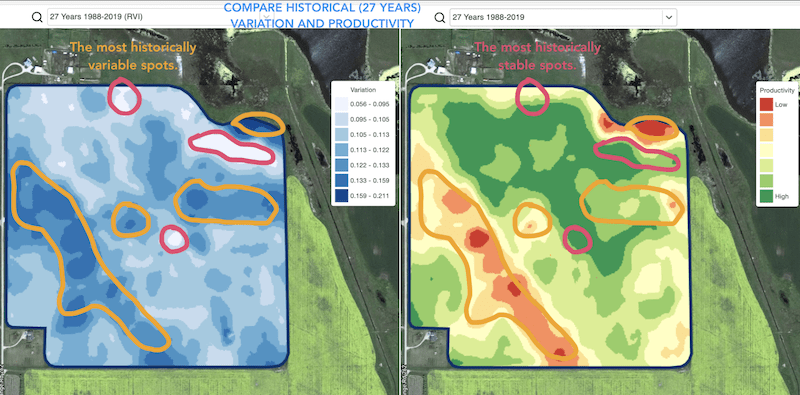
* vyhledání míst s podobnými výsledky napříč 5–10–20 lety a umístění pokusů do oblastí s podobnými podmínkami, aby se snížila pravděpodobnost chyby
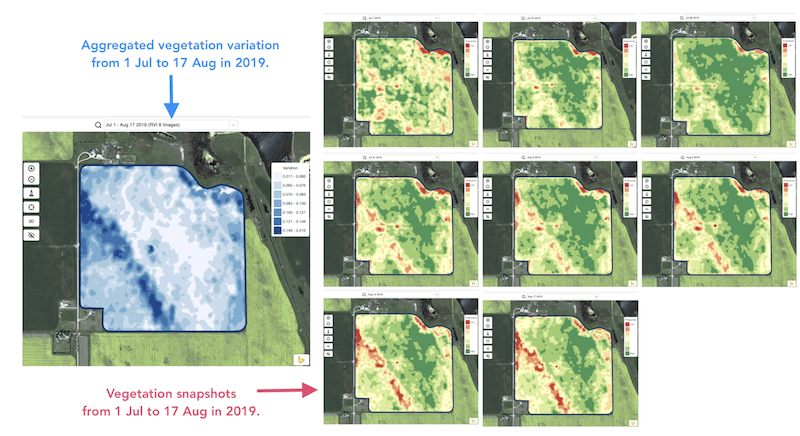
* sledování změn během sezóny a hodnocení výkonu porostu v průběhu růstu
* rozpoznání poškozených oblastí po extrémním počasí nebo po napadení chorobou či škůdcem a výpočet poškozených ploch
* zjištění rozdílu mezi posledními dvěma snímky a kontrolu vývoje porostu.
Index relativní variability (RVI) od GeoPardu pokrývá všechny tyto případy i mnoho dalších. RVI přinese více poznatků o vývoji plodiny, když se používá společně s průběžnými a historickými zónami řízení.
Stačí vybrat své pole a satelitní snímky, sledovat na nich změny a získat přehled o každém místě na vašem poli.
---
# Agent Instructions
This documentation is published with GitBook. GitBook is the documentation platform designed so that both humans and AI agents can read, navigate, and reason over technical content effectively. Learn more at gitbook.com.
## Querying This Documentation
If you need additional information that is not directly available in this page, you can query the documentation by asking a question.
Perform an HTTP GET request on the following URL with the `ask` and `goal` query parameters:
```
GET https://docs.geopard.tech/geopard-tutorials/cze/prohlidka-produktu-webova-aplikace/zonove-mapy-a-analyzy/faktor-relativni-variability.md?ask=&goal=
```
`ask` is the immediate question: it should be specific, self-contained, and written in natural language.
`goal` is what the user is ultimately trying to achieve, the reason they need the answer. Sharing it helps GitBook give you a better, more relevant answer. A goal is most helpful when it describes the outcome the user wants rather than restating the question. For example, with `ask=how do I create an API token`, a goal like `automate deployments from our CI pipeline` lets GitBook tailor the answer to that use case.
The response will contain a direct answer to the question and relevant excerpts and sources from the documentation.
Use this mechanism when the answer is not explicitly present in the current page, you need clarification or additional context, or you want to retrieve related documentation sections.