> For the complete documentation index, see [llms.txt](https://docs.geopard.tech/geopard-tutorials/llms.txt). Markdown versions of documentation pages are available by appending `.md` to page URLs; this page is available as [Markdown](https://docs.geopard.tech/geopard-tutorials/cze/dokumentace-api/prehled-pozadavku-geopard-api/87.-mutace-ulozeni-vlastni-vektorove-analyticke-mapy-zonove-mapy.md).
# 87. Mutace: Uložení vlastní vektorové analytické mapy (zónové mapy)
Níže jsou podrobnosti o tom, jak uložit Vlastní mapu zón (ZonesMap) s vlastním schématem barev.
### 1. Uložení geometrií ZonesMap
{% hint style="danger" %}
VectorAnalysisMap (ZonesMap) `zonesMapGeojson` atribut musí být v projekci WGS84 (EPSG:4326) a odpovídat specifikaci GeoJson [specifikace](https://geojson.org/).
Očekávaný `geojson` typ je `FeatureCollection` s `MultiPolygon`.
{% endhint %}
Mutace `saveVectorAnalysisMap` přehled:
* Atribut `fieldUuid` je propojení na existující pole (Field).
* Atribut `název` popisuje název ZonesMap.
* Typ atributu je hodnota výčtu (enum) představující typ operace. Může být jakákoli hodnota z `OBECNÉ` , `POSTŘIK`, `OSEV`, `HNOJENÍ` nebo `ZAVLAŽOVÁNÍ`. Je volitelný.
* Klíčovým atributem se všemi podrobnostmi včetně dávek pro VRA je `zonesMapGeojson` jako escapovaný JSON řetězec.
* Číslo zóny je uvedeno v `vlastnostech` >> `zóna`.
* Dávky budou začleněny do `vlastnostech` >> `atributů`.
The `vlastnostech` atribut je JSON objekt, který je rozšířen o `zóna`, `dávky`, `ratesHeaders`, `ratesPrices` a `ratesUnits` podrobnosti. \
Vysvětlení, jak přiřadit dávky, je [ZDE](/geopard-tutorials/cze/dokumentace-api/prehled-pozadavku-geopard-api/85.-mutace-prirazeni-sazeb-k-vektorove-analyticke-mape-zonove-mape.md).
{% code overflow="wrap" lineNumbers="true" %}
```json
{
\"zone\":1,
\"attributes\":{
\"rates\":[100],
\"ratesHeaders\":[\"Produkt1\"],
\"ratesPrices\":[0],
\"ratesUnits\":[\"KG_HA\"]
}
}
```
{% endcode %}
Ukázková mutace bez definovaných dávek:
{% code overflow="wrap" lineNumbers="true" %}
```graphql
mutation saveVectorAnalysisMap {
saveVectorAnalysisMap(
input: {
fieldUuid:"abef3a63-a64b-4d84-aab0-43eaa8fbe0cd"
name:"Vlastní zóny"
zonesMapGeojson:"{\"type\":\"FeatureCollection\",\"features\":[{\"type\":\"Feature\",\"properties\":{\"zone\":1,\"attributes\":{}},\"geometry\":{\"type\":\"MultiPolygon\",\"coordinates\":[[[[10.426584494429108,52.872847225483895],[10.426789204309529,52.87282914352929],[10.42676923261385,52.87256092698456],[10.42679456306152,52.87240585041315],[10.427391783218683,52.87195386627311],[10.427338425939524,52.872087776901424],[10.427073800972806,52.87238914697767],[10.426899048635903,52.872624214183844],[10.42701887880915,52.872889416681545],[10.427403333950082,52.87288037571423],[10.427498199505067,52.872940648795804],[10.427403333950082,52.8731003720562],[10.42777780324397,52.873242012946434],[10.428022456514952,52.87323297205208],[10.428167251308338,52.8731244811766],[10.42807737867767,52.87286832108788],[10.42809735037332,52.87259407743369],[10.428501777209902,52.872404215426826],[10.428611621536277,52.87250969442229],[10.42882132434022,52.87257900905101],[10.429100928079123,52.87232585943539],[10.429155850242694,52.87216914702836],[10.429205779481066,52.87184065187668],[10.429263945397143,52.87180554285836],[10.42928833,52.87242022],[10.42922193,52.8725049],[10.42915175626986,52.87255993568499],[10.429021041297204,52.872554899627374],[10.428771395100966,52.872708596972984],[10.42838693996012,52.872847225483895],[10.428257123938948,52.87296777165494],[10.428370342208543,52.873172781233286],[10.42795711,52.87349687],[10.42718139841625,52.87321758481732],[10.427228581614003,52.87319078118864],[10.427208609918353,52.87305516741958],[10.42683913354881,52.873015990029785],[10.426664381211879,52.87293763514347],[10.426584494429108,52.872847225483895]]],[[[10.427804124872603,52.871641800637654],[10.42875584,52.87092153],[10.42897875,52.87105982],[10.42921404,52.87137376],[10.429231472601687,52.87152239994234],[10.428951140362273,52.871638731603355],[10.42879635972102,52.87193709107814],[10.428666543698995,52.872057639778546],[10.428371961188788,52.872057639778546],[10.42821218762407,52.87183161069021],[10.427967534352206,52.871708047624395],[10.427804124872603,52.871641800637654]]]]}},{\"type\":\"Feature\",\"properties\":{\"zone\":2,\"attributes\":{}},\"geometry\":{\"type\":\"MultiPolygon\",\"coordinates\":[[[[10.426899048635903,52.872624214183844],[10.427073800972806,52.87238914697767],[10.427338425939524,52.872087776901424],[10.427391783218683,52.87195386627311],[10.427804124872603,52.871641800637654],[10.427967534352206,52.871708047624395],[10.42821218762407,52.87183161069021],[10.428371961188788,52.872057639778546],[10.428666543698995,52.872057639778546],[10.42879635972102,52.87193709107814],[10.428951140362273,52.871638731603355],[10.429231472601687,52.87152239994234],[10.42926357,52.87179608],[10.429263945397143,52.87180554285836],[10.429205779481066,52.87184065187668],[10.429155850242694,52.87216914702836],[10.429100928079123,52.87232585943539],[10.42882132434022,52.87257900905101],[10.428611621536277,52.87250969442229],[10.428501777209902,52.872404215426826],[10.42809735037332,52.87259407743369],[10.42807737867767,52.87286832108788],[10.428167251308338,52.8731244811766],[10.428022456514952,52.87323297205208],[10.42777780324397,52.873242012946434],[10.427403333950082,52.8731003720562],[10.427498199505067,52.872940648795804],[10.427403333950082,52.87288037571423],[10.42701887880915,52.872889416681545],[10.426899048635903,52.872624214183844]]]]}},{\"type\":\"Feature\",\"properties\":{\"zone\":3,\"attributes\":{}},\"geometry\":{\"type\":\"MultiPolygon\",\"coordinates\":[[[[10.428257123938948,52.87296777165494],[10.42838693996012,52.872847225483895],[10.428771395100966,52.872708596972984],[10.429021041297204,52.872554899627374],[10.42915175626986,52.87255993568499],[10.428370342208543,52.873172781233286],[10.428257123938948,52.87296777165494]]],[[[10.42619246,52.87286153],[10.42679456306152,52.872405850413145],[10.42676923261385,52.87256092698456],[10.426789204309529,52.87282914352929],[10.426584494429108,52.872847225483895],[10.426664381211879,52.87293763514347],[10.42683913354881,52.873015990029785],[10.427208609918353,52.87305516741958],[10.427228581614003,52.87319078118864],[10.42718139841625,52.87321758481732],[10.42619246,52.87286153]]]]}}]}"
}
) {
uuid
}
}
```
{% endcode %}
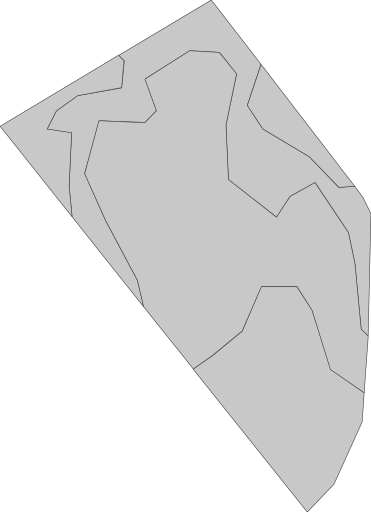
Výchozí zobrazení bez přiřazeného schématu barev vypadá takto. Uživatelská ZonesMap >> `geoMaps` >> `url` je podobná [https://api.geopard.tech/geo/map/reflect?TRANSPARENT=true\&VIEWPARAMS=uuid:4a3929a5-c166-41d7-b547-da1511a9fa1d\&LAYERS=custom\_zone\_map\_view\&SRS=EPSG:3857\&STYLES=default\_zonesmap\&HEIGHT=64\&BBOX=1160638.4354309493,6959157.496681602,1160983.0667152018,6959632.459385279\&geopardApiKey=\](https://api.geopard.tech/geo/map/reflect?TRANSPARENT=true\&VIEWPARAMS=uuid:4a3929a5-c166-41d7-b547-da1511a9fa1d\&LAYERS=custom_zone_map_view\&SRS=EPSG:3857\&STYLES=default_zonesmap\&HEIGHT=64\&BBOX=1160638.4354309493,6959157.496681602,1160983.0667152018,6959632.459385279\&geopardApiKey=).
### 2. Přiřazení vlastního schématu barev
Mutace `setGeoMaps` přehled:
* Atribut `fieldUuid` je propojení na existující pole (Field).
* Atribut `vectorAnalysisMapUuid` je propojení na právě uloženou ZonesMap (VectorAnalysisMap) z prvního kroku.
* Atribut `krátkýNázev` popisuje styl, který se má upravit. \
Možnosti pro ZonesMap jsou `zóny` a `náhled`.
* Atribut `hexColorCodes` popisuje hexadecimální kódy barev, které se mají nastavit.
{% hint style="danger" %}
Počet barev v `hexColorCodes` musí odpovídat přesnému počtu existujících zón`.`
{% endhint %}
Vysvětlení, jak uložit vlastní barvy, je [ZDE](/geopard-tutorials/cze/dokumentace-api/prehled-pozadavku-geopard-api/39.-mutace-nastaveni-vlastnich-barevnych-schemat-pro-vybrane-geomapy.md) a jak aplikovat vlastní barvy okamžitě je [ZDE](/geopard-tutorials/cze/dokumentace-api/geo-koncove-body-pro-pristup-k-prostorovym-datum/wms-ziskani-rastrovych-obrazku-vrstev-prostorovych-dat/6.-zonova-mapa-vlastni-barevne-schema.md).
Ukázková mutace:
{% code overflow="wrap" lineNumbers="true" %}
```graphql
mutation setGeoMaps{
setGeoMaps(
input: {
geoMaps:[
{
shortName:"zones"
fieldUuid:"abef3a63-a64b-4d84-aab0-43eaa8fbe0cd"
vectorAnalysisMapUuid:"9799e2eb-06d2-4a42-8f47-38655abf11e1"
hexColorCodes:[
"#ffffbf",
"#66bd63",
"#f46d43"
]
}, {
shortName:"thumbnail"
fieldUuid:"abef3a63-a64b-4d84-aab0-43eaa8fbe0cd"
vectorAnalysisMapUuid:"9799e2eb-06d2-4a42-8f47-38655abf11e1"
hexColorCodes:[
"#ffffbf",
"#66bd63",
"#f46d43"
]
}
]
}
) {
krátkýNázev
}
}
```
{% endcode %}
V důsledku toho je vizuální zobrazení z ZonesMap >> `geoMaps` >> `url` podobné [https://api.geopard.tech/geo/map/reflect?TRANSPARENT=true\&VIEWPARAMS=uuid:9799e2eb-06d2-4a42-8f47-38655abf11e1\&LAYERS=custom\_zone\_map\_view\&SRS=EPSG:3857\&STYLES=default\_zonesmap\&HEIGHT=64\&BBOX=1160638.4354309493,6959157.496681602,1160983.0667152018,6959632.459385279\&env=c1:#ffffbf;c2:#66bd63;c3:#f46d43\&geopardApiKey=\](https://api.geopard.tech/geo/map/reflect?TRANSPARENT=true\&VIEWPARAMS=uuid:9799e2eb-06d2-4a42-8f47-38655abf11e1\&LAYERS=custom_zone_map_view\&SRS=EPSG:3857\&STYLES=default_zonesmap\&HEIGHT=64\&BBOX=1160638.4354309493,6959157.496681602,1160983.0667152018,6959632.459385279\&env=c1:#ffffbf;c2:#66bd63;c3:#f46d43\&geopardApiKey=) vypadá takto.
---
# Agent Instructions
This documentation is published with GitBook. GitBook is the documentation platform designed so that both humans and AI agents can read, navigate, and reason over technical content effectively. Learn more at gitbook.com.
## Querying This Documentation
If you need additional information that is not directly available in this page, you can query the documentation by asking a question.
Perform an HTTP GET request on the following URL with the `ask` and `goal` query parameters:
```
GET https://docs.geopard.tech/geopard-tutorials/cze/dokumentace-api/prehled-pozadavku-geopard-api/87.-mutace-ulozeni-vlastni-vektorove-analyticke-mapy-zonove-mapy.md?ask=&goal=
```
`ask` is the immediate question: it should be specific, self-contained, and written in natural language.
`goal` is what the user is ultimately trying to achieve, the reason they need the answer. Sharing it helps GitBook give you a better, more relevant answer. A goal is most helpful when it describes the outcome the user wants rather than restating the question. For example, with `ask=how do I create an API token`, a goal like `automate deployments from our CI pipeline` lets GitBook tailor the answer to that use case.
The response will contain a direct answer to the question and relevant excerpts and sources from the documentation.
Use this mechanism when the answer is not explicitly present in the current page, you need clarification or additional context, or you want to retrieve related documentation sections.