> For the complete documentation index, see [llms.txt](https://docs.geopard.tech/geopard-tutorials/llms.txt). Markdown versions of documentation pages are available by appending `.md` to page URLs; this page is available as [Markdown](https://docs.geopard.tech/geopard-tutorials/bg/obikolka-na-produkta-ueb-prilozhenie/karti-na-zoni-i-analizi/szdai-karta-na-zoni-s-pochveni-dobivni-ili-as-applied-danni.md).
# Създай карта на зони с почвени, добивни или as-applied данни
Ако искате да създадете карта на зони от набор данни, първо качете данните към полето.
1. Изберете полето в списъка, щракнете върху **Създай карта на зони** бутона, изберете **Еднослоен**и след това щракнете върху **Напред**.
2. Изберете **Данни за почвата** тип, за да продължите. Можете също да използвате Данни за добива или Данни за приложеното.
3. В следващата стъпка изберете конкретния набор от почвени данни, който искате да използвате, и щракнете върху **Напред**.
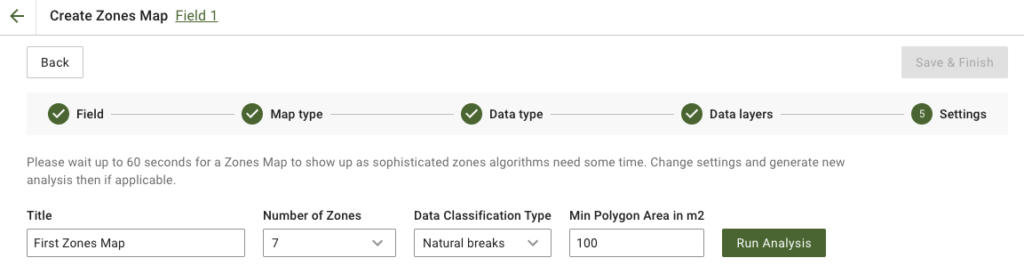
4. В следващата стъпка можете да редактирате заглавието, да промените броя на зоните, [изберете тип класификация на данните](/geopard-tutorials/bg/obikolka-na-produkta-ueb-prilozhenie/karti-na-zoni-i-analizi/izpolzvane-na-klasifikaciya-na-dannite.md)и задайте минимална площ на полигона в квадратни метри. Щракнете върху **Стартирай анализ** за да продължите.
Анализът може да се изпълнява до 60 секунди в зависимост от зададените от вас параметри.
5. След като приключи, щракнете върху **Запази и завърши**.
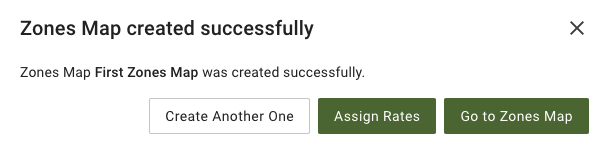
След като бъде записано, ще видите следното съобщение:
Можете да създадете още една карта на зони, да зададете норми или да отворите току-що създадената карта на зони. Ако я отворите, ще видите подобен изглед.
---
# Agent Instructions
This documentation is published with GitBook. GitBook is the documentation platform designed so that both humans and AI agents can read, navigate, and reason over technical content effectively. Learn more at gitbook.com.
## Querying This Documentation
If you need additional information that is not directly available in this page, you can query the documentation dynamically by asking a question.
Perform an HTTP GET request on the current page URL with the `ask` query parameter, and the optional `goal` query parameter:
```
GET https://docs.geopard.tech/geopard-tutorials/bg/obikolka-na-produkta-ueb-prilozhenie/karti-na-zoni-i-analizi/szdai-karta-na-zoni-s-pochveni-dobivni-ili-as-applied-danni.md?ask=&goal=
```
`ask` is the immediate question: it should be specific, self-contained, and written in natural language.
`goal` is optional and describes the broader end goal you are ultimately trying to accomplish on behalf of the user. GitBook uses it to tailor the answer towards what is most useful for that goal.
The response will contain a direct answer to the question and relevant excerpts and sources from the documentation.
Use this mechanism when the answer is not explicitly present in the current page, you need clarification or additional context, or you want to retrieve related documentation sections.