> For the complete documentation index, see [llms.txt](https://docs.geopard.tech/geopard-tutorials/llms.txt). Markdown versions of documentation pages are available by appending `.md` to page URLs; this page is available as [Markdown](https://docs.geopard.tech/geopard-tutorials/bg/produktova-obikolka-ueb-prilozhenie/analizi-na-baza-uravneniya/paketni-analizi-po-uravneniya.md).
# Пакетни анализи по уравнения
Стартирайте анализи по уравнения за множество полета паралелно.
Батч **аналитика** разширява [Аналитика на базата на уравнения](/geopard-tutorials/bg/produktova-obikolka-ueb-prilozhenie/analizi-na-baza-uravneniya.md) като ви позволява да прилагате едно уравнение към няколко полета наведнъж. Това ускорява генерирането на карти по уравнение и улеснява управлението на големи работни процеси.
Приложението автоматично разпознава необходимите набори от данни и атрибути за всяка променлива във вашето уравнение, като осигурява точни резултати. Всяка генерирана карта включва ключови статистики като сума и средна стойност, а в долната част на страницата е предоставено подробно обобщение на всички генерирани карти за лесен преглед.
### Основни функции
* Генерирайте карти за всяка група полета, включително карти на печалбата и VRA карти за сеитба, пръскане, торене или изчисления на усвояване.
* Изчислявайте средни стойности за полетата и общи обеми на вложенията във всички полета, за да планирате по-ефективно покупките. Използвайте всяка GeoPard или собствена формула, включително ефективност, [Ефективност на използване на торове](https://geopard.tech/blog/nitrogen-use-efficiency-use-case-from-lva-john-deere-dealer-from-germany), [Карти на печалбата](https://geopard.tech/blog/introducing-geopards-profit-maps-a-step-forward-in-precision-agriculture), усвояване на торове или формули, базирани на сателитни изображения.
* GeoPard автоматично свързва променливите със слоевете и атрибутите. Не е нужно ръчно да свързвате Yield Dry към набора от данни Yield или pH към pH на почвеното пробовземане.
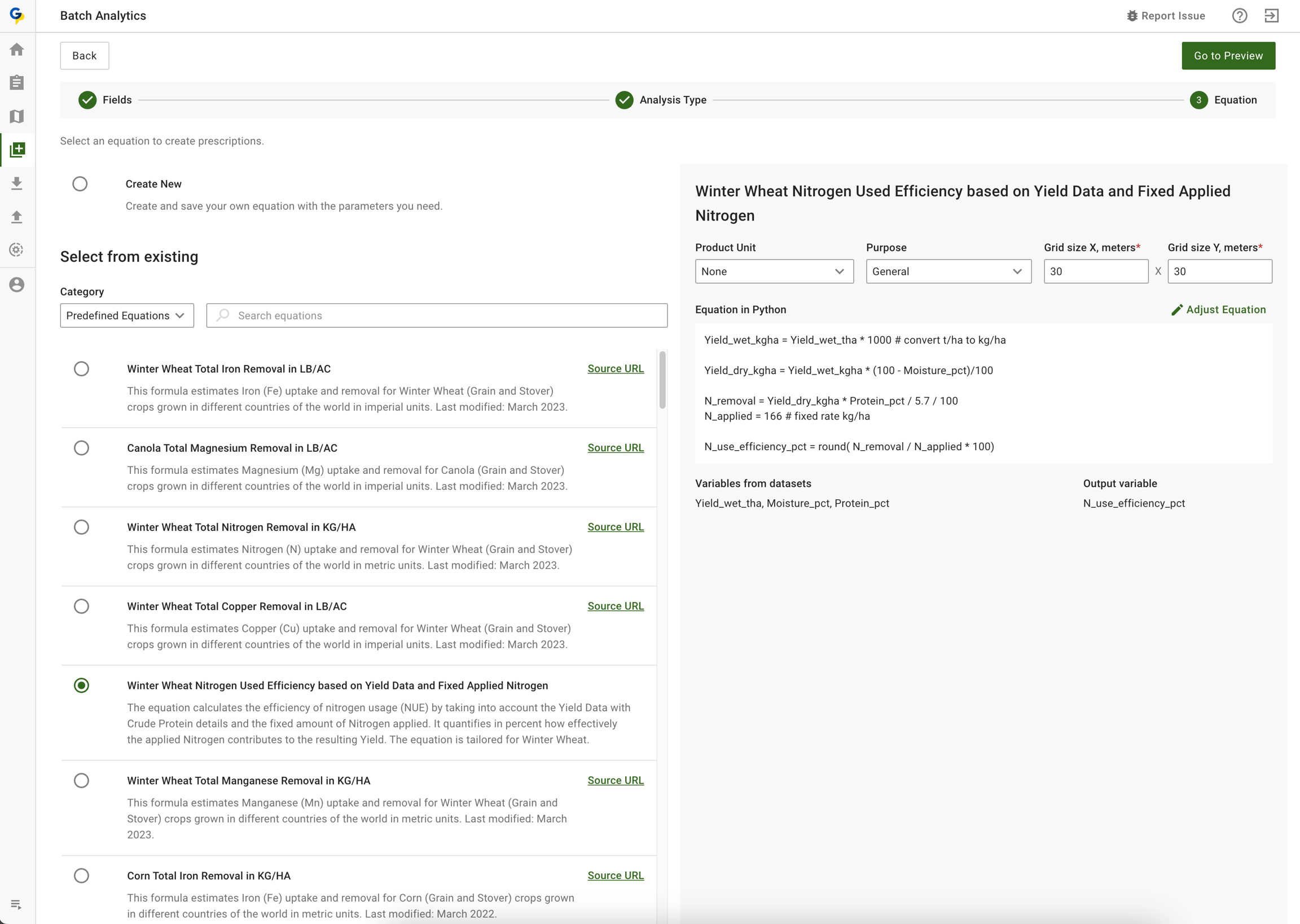
### Стъпка 1 - Изберете (или създайте) уравнение и полета
Стъпка 1 - Изберете (или създайте) уравнение и полета
### Стъпка 2 - Стартирайте групово изчисление на отнемането на азот въз основа на данни за добива и влагата
Стъпка 2 - Вижте резултатите, при нужда коригирайте слоевете с данни и формулата.
### Стъпка 3 - Изпълнете повторно всяка карта поотделно или групово
### Стъпка 4 - Изтеглете всички създадени карти или поотделно
---
# Agent Instructions
This documentation is published with GitBook. GitBook is the documentation platform designed so that both humans and AI agents can read, navigate, and reason over technical content effectively. Learn more at gitbook.com.
## Querying This Documentation
If you need additional information that is not directly available in this page, you can query the documentation by asking a question.
Perform an HTTP GET request on the following URL with the `ask` and `goal` query parameters:
```
GET https://docs.geopard.tech/geopard-tutorials/bg/produktova-obikolka-ueb-prilozhenie/analizi-na-baza-uravneniya/paketni-analizi-po-uravneniya.md?ask=&goal=
```
`ask` is the immediate question: it should be specific, self-contained, and written in natural language.
`goal` is what the user is ultimately trying to achieve, the reason they need the answer. Sharing it helps GitBook give you a better, more relevant answer. A goal is most helpful when it describes the outcome the user wants rather than restating the question. For example, with `ask=how do I create an API token`, a goal like `automate deployments from our CI pipeline` lets GitBook tailor the answer to that use case.
The response will contain a direct answer to the question and relevant excerpts and sources from the documentation.
Use this mechanism when the answer is not explicitly present in the current page, you need clarification or additional context, or you want to retrieve related documentation sections.