> For the complete documentation index, see [llms.txt](https://docs.geopard.tech/geopard-tutorials/llms.txt). Markdown versions of documentation pages are available by appending `.md` to page URLs; this page is available as [Markdown](https://docs.geopard.tech/geopard-tutorials/bg/dokumentaciya-na-api/prvi-stpki-s-geopard-api.md).
# Първи стъпки с GeoPard API
Екипът на GeoPard силно препоръчва да започнете с Altair, за да разгледате подробно функционалностите на GeoPard API. Той последователно извлича най-новата версия на наличните обекти, заявки, мутации и абонаменти. Моля, вижте краткото ръководство за бърз старт по-долу:
1. Инсталирайте разширението Altair GraphQL за Chrome от този [ЛИНК](https://chrome.google.com/webstore/detail/altair-graphql-client/flnheeellpciglgpaodhkhmapeljopja) или като алтернатива използвайте Altair GraphQL Client директно в [вашия браузър](https://altairgraphql.dev/).
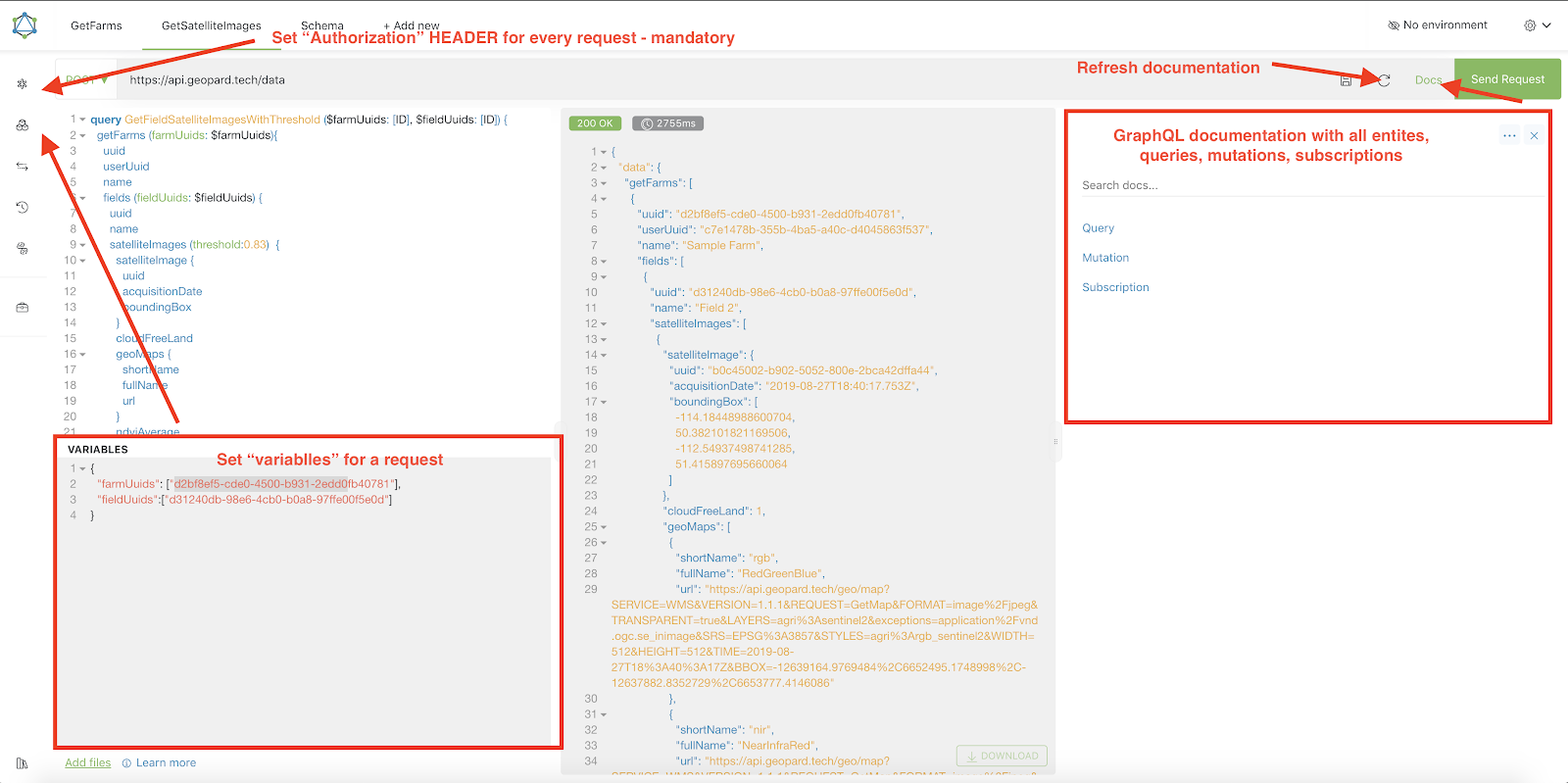
2. Всяка заявка трябва да бъде удостоверена с `Authorization` HEADER, като необходимият токен трябва да бъде включен. За бързо тестване, `Authorization` стойността на HEADER може да бъде получена от заявките след влизане в GeoPard Agriculture.\
\&#xNAN;*Кратко обяснение е показано на екранната снимка по-долу.*
3. Коренната GraphQL крайна точка се намира на [`https://api.geopard.tech/data`](https://api.geopard.tech/data).\
\&#xNAN;*Кратко обяснение е показано на екранната снимка по-долу.*
4. Достъп до GraphQL схемата може да бъде намерен под бутона "Docs" в интерфейса на Altair. Този раздел ви позволява да се придвижвате през всички налични Queries, Mutations и Subscriptions. Освен това той дава представа за различните обекти и техните съответни структури, предоставяйки цялостно разбиране за GraphQL настройката на системата.\
\&#xNAN;*Кратко обяснение е показано на екранната снимка по-долу.*
5. Потвърдете, че изходящите заявки работят правилно, като използвате конзолата за разработчици на вашия браузър. Можете да приложите филтри за заявки като `/data`.
6. Схемата може да бъде достъпена от този [ТУК](/geopard-tutorials/bg/dokumentaciya-na-api/skhema-na-dannite-v-geopard-api.md).
7. За качване на файлове използваме [тези крайни точки](/geopard-tutorials/bg/dokumentaciya-na-api/pregled-na-zayavkite-km-geopard-api/55.-kachvane-na-zip-failove-nad-6-mb.md).
8. За достъп до растерни и векторни данни използваме OGC WMS (растерни изображения за бързо визуализиране) и WFS формати (`shp`, `geojson`). За повече информация, моля, вижте нашия [Geo Endpoint](/geopard-tutorials/bg/dokumentaciya-na-api/geo-kraini-tochki-za-dostp-do-prostranstveni-danni.md)сектор.
{% hint style="info" %}
Кратко ръководство със съвети как да работите с Altair е отбелязано на екранната снимка по-долу.
{% endhint %}
Altrair: Кратко ръководство
---
# Agent Instructions
This documentation is published with GitBook. GitBook is the documentation platform designed so that both humans and AI agents can read, navigate, and reason over technical content effectively. Learn more at gitbook.com.
## Querying This Documentation
If you need additional information that is not directly available in this page, you can query the documentation by asking a question.
Perform an HTTP GET request on the following URL with the `ask` and `goal` query parameters:
```
GET https://docs.geopard.tech/geopard-tutorials/bg/dokumentaciya-na-api/prvi-stpki-s-geopard-api.md?ask=&goal=
```
`ask` is the immediate question: it should be specific, self-contained, and written in natural language.
`goal` is what the user is ultimately trying to achieve, the reason they need the answer. Sharing it helps GitBook give you a better, more relevant answer. A goal is most helpful when it describes the outcome the user wants rather than restating the question. For example, with `ask=how do I create an API token`, a goal like `automate deployments from our CI pipeline` lets GitBook tailor the answer to that use case.
The response will contain a direct answer to the question and relevant excerpts and sources from the documentation.
Use this mechanism when the answer is not explicitly present in the current page, you need clarification or additional context, or you want to retrieve related documentation sections.