> For the complete documentation index, see [llms.txt](https://docs.geopard.tech/geopard-tutorials/llms.txt). Markdown versions of documentation pages are available by appending `.md` to page URLs; this page is available as [Markdown](https://docs.geopard.tech/geopard-tutorials/ar/jwlh-almntj-ttbyq-alwyb/khraet-almnatq-walthlylat/inshaa-khryth-mnatq-bastkhdam-byanat-altrbh-aw-alghlh-aw-alttbyq-alfaly.md).
# إنشاء خريطة مناطق باستخدام بيانات التربة أو الغلة أو التطبيق الفعلي
أنشئ مناطق إدارة من بيانات التربة أو الغلة أو الآلات لتعكس التباين الحقيقي في الحقل.
إذا كنت ترغب في إنشاء خريطة مناطق من مجموعة بيانات، فقم أولًا بتحميل البيانات إلى الحقل.
1. حدد الحقل في القائمة، وانقر على **إنشاء خريطة مناطق** الزر، ثم اختر **طبقة واحدة**، ثم انقر على **التالي**.
2. اختر **بيانات التربة** للنوع للمتابعة. يمكنك أيضًا استخدام بيانات الغلة أو بيانات التطبيق الفعلي.
3. في الخطوة التالية، اختر مجموعة بيانات التربة المحددة التي تريد استخدامها وانقر على **التالي**.
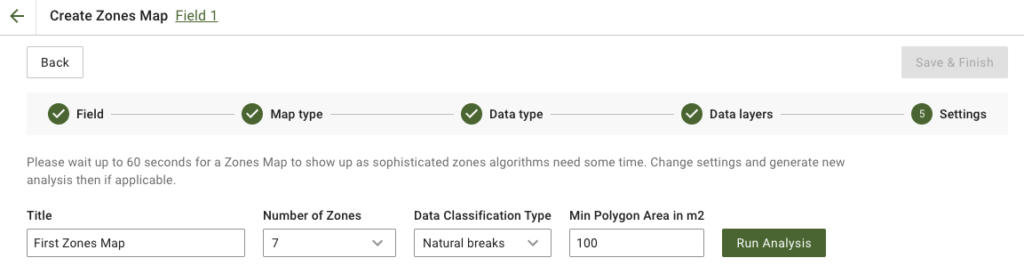
4. في الخطوة التالية، يمكنك تعديل العنوان، وتغيير عدد المناطق، [اختيار نوع تصنيف البيانات](/geopard-tutorials/ar/jwlh-almntj-ttbyq-alwyb/khraet-almnatq-walthlylat/bastkhdam-tsnyf-albyanat.md)، وتحديد الحد الأدنى لمساحة المضلع بالمتر المربع. انقر على **تشغيل التحليل** للمتابعة.
قد يستغرق التحليل ما يصل إلى 60 ثانية، حسب المعلمات التي حددتها.
5. بمجرد الانتهاء، انقر على **حفظ وإنهاء**.
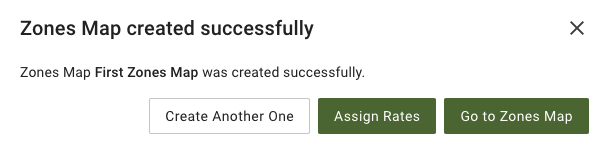
بعد حفظه، سترى الرسالة التالية:
يمكنك إنشاء خريطة مناطق أخرى، أو تعيين معدلات، أو فتح خريطة المناطق التي أنشأتها للتو. إذا فتحتها، فسترى عرضًا مشابهًا.
---
# Agent Instructions
This documentation is published with GitBook. GitBook is the documentation platform designed so that both humans and AI agents can read, navigate, and reason over technical content effectively. Learn more at gitbook.com.
## Querying This Documentation
If you need additional information that is not directly available in this page, you can query the documentation by asking a question.
Perform an HTTP GET request on the following URL with the `ask` and `goal` query parameters:
```
GET https://docs.geopard.tech/geopard-tutorials/ar/jwlh-almntj-ttbyq-alwyb/khraet-almnatq-walthlylat/inshaa-khryth-mnatq-bastkhdam-byanat-altrbh-aw-alghlh-aw-alttbyq-alfaly.md?ask=&goal=
```
`ask` is the immediate question: it should be specific, self-contained, and written in natural language.
`goal` is what the user is ultimately trying to achieve, the reason they need the answer. Sharing it helps GitBook give you a better, more relevant answer. A goal is most helpful when it describes the outcome the user wants rather than restating the question. For example, with `ask=how do I create an API token`, a goal like `automate deployments from our CI pipeline` lets GitBook tailor the answer to that use case.
The response will contain a direct answer to the question and relevant excerpts and sources from the documentation.
Use this mechanism when the answer is not explicitly present in the current page, you need clarification or additional context, or you want to retrieve related documentation sections.