> For the complete documentation index, see [llms.txt](https://docs.geopard.tech/geopard-tutorials/llms.txt). Markdown versions of documentation pages are available by appending `.md` to page URLs; this page is available as [Markdown](https://docs.geopard.tech/geopard-tutorials/ar/jwlh-almntj-ttbyq-alwyb/khraet-almnatq-walthlylat/aaml-altbayn-alnsby.md).
# عامل التباين النسبي
كمّ التباين المكاني نسبةً إلى المتوسط لمقارنة التباين عبر الحقول ومجموعات البيانات.
إن اكتشاف التغييرات التي حدثت في الحقل خلال الأسبوع أو الأسبوعين الماضيين أو خلال شهر أو شهرين، أو حتى خلال بضع سنوات، يساعد على استجلاء رؤى حول تطور المحصول.
يمكن استخدام عامل التباين النسبي أو مؤشر التباين النسبي من أجل:
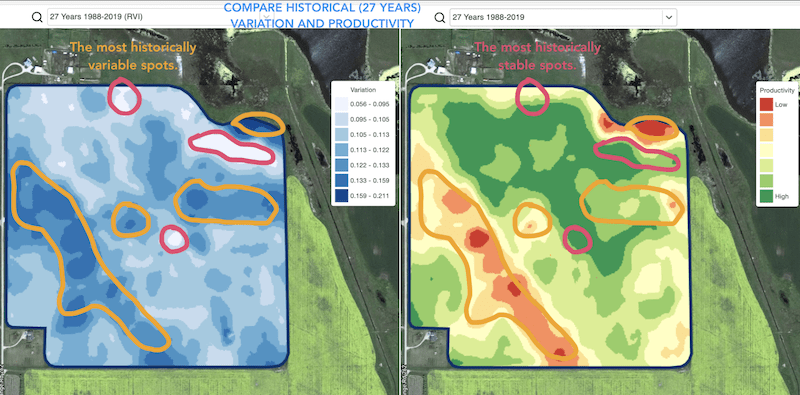
* تحديد البقع ذات الأداء المتشابه عبر 5-10-20 سنة ووضع التجارب في مناطق ذات ظروف متشابهة لتقليل احتمال الخطأ
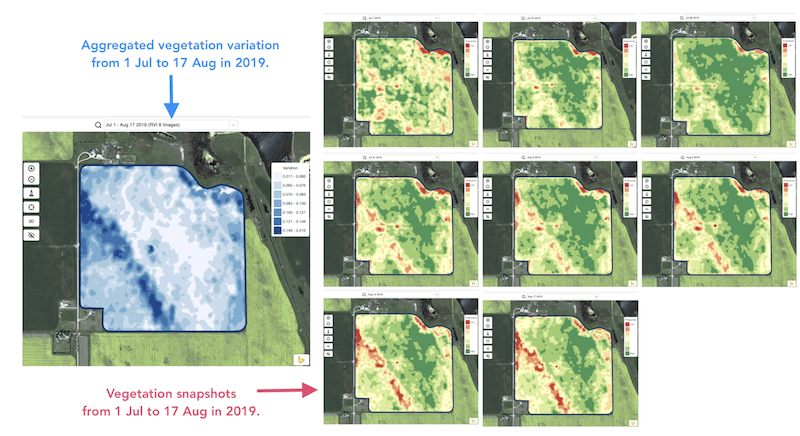
* تتبّع التغيرات خلال الموسم وتقييم أداء المحصول أثناء النمو
* التعرّف على المناطق المتضررة بعد كارثة جوية أو إصابة بمرض أو هجوم آفة، وحساب المساحات المتضررة
* اكتشاف الفرق بين آخر صورتين والتحكم في أداء المحصول.
يغطي مؤشر التباين النسبي (RVI) من GeoPard كل تلك الحالات وغيرها الكثير. وسيقدّم RVI المزيد من الرؤى حول تطور المحصول عند استخدامه معًا بالاقتران مع مناطق الإدارة الموسمية والتاريخية.
ما عليك سوى اختيار حقلك وصور الأقمار الصناعية لتتبّع التغيرات عبرهما والحصول على رؤى حول كل بقعة في حقلك.
---
# Agent Instructions
This documentation is published with GitBook. GitBook is the documentation platform designed so that both humans and AI agents can read, navigate, and reason over technical content effectively. Learn more at gitbook.com.
## Querying This Documentation
If you need additional information that is not directly available in this page, you can query the documentation by asking a question.
Perform an HTTP GET request on the following URL with the `ask` and `goal` query parameters:
```
GET https://docs.geopard.tech/geopard-tutorials/ar/jwlh-almntj-ttbyq-alwyb/khraet-almnatq-walthlylat/aaml-altbayn-alnsby.md?ask=&goal=
```
`ask` is the immediate question: it should be specific, self-contained, and written in natural language.
`goal` is what the user is ultimately trying to achieve, the reason they need the answer. Sharing it helps GitBook give you a better, more relevant answer. A goal is most helpful when it describes the outcome the user wants rather than restating the question. For example, with `ask=how do I create an API token`, a goal like `automate deployments from our CI pipeline` lets GitBook tailor the answer to that use case.
The response will contain a direct answer to the question and relevant excerpts and sources from the documentation.
Use this mechanism when the answer is not explicitly present in the current page, you need clarification or additional context, or you want to retrieve related documentation sections.